

Sympozium: Running AI Agents Natively in Kubernetes
The Evolution of AI Agents
AI agents did not appear overnight. They evolved through several distinct phases, each solving limitations of the previous one.
Rule-based automation came first — shell scripts, cron jobs, simple bots. They were deterministic and predictable but brittle. Any input outside the expected format broke them.
Chatbots added natural language interfaces but were still essentially decision trees. They could parse intent but could not reason or adapt.
LLM-powered agents changed the picture fundamentally. With models like GPT-4 and Claude, agents gained the ability to reason, use tools, and handle ambiguous inputs. Frameworks like LangChain, AutoGen, and CrewAI made it easy to wire LLMs to external APIs, code interpreters, and databases.
But these frameworks shared a common problem: they ran as long-lived processes on bare servers or in unmanaged containers. No isolation between runs. No audit trail. No consistent access control. A single compromised agent could reach everything the process had credentials for.
The next step was inevitable: bring agents into Kubernetes — the platform already designed to manage workloads, enforce policies, and provide isolation at scale.
Two projects emerged to solve this in different ways:
| Feature | Sympozium | Kagent |
|---|---|---|
| Agent runtime | Ephemeral Pod per run | Long-running engine process |
| Tool isolation | Sidecar per skill + ephemeral RBAC | In-process MCP client |
| Kernel sandboxing | ✅ gVisor / Kata + warm pools | ❌ |
| Multi-tenancy | ✅ Namespace + RBAC + admission webhooks | ➖ Namespace-scoped CRDs |
| Agent packaging | ✅ PersonaPacks | ➖ Individual Agent CRDs |
| Persistent memory | ✅ SQLite + FTS5 on PVC | ✅ Vector-backed (in-engine) |
| Telegram / WhatsApp | ✅ Stable | ❌ |
| Slack / Discord | ✅ Alpha | ✅ In-engine |
| Scheduled runs | ✅ SympoziumSchedule CRD |
❌ |
| MCP support | ✅ MCPServer CRD |
✅ MCP tools as CRDs |
| A2A protocol | ❌ | ✅ |
| Framework integration | ❌ | ✅ LangGraph, Google ADK, CrewAI |
| Observability | TUI + Web UI + live logs | Dashboard + OpenTelemetry |
| Human-in-the-loop | ✅ SympoziumPolicy CRD |
✅ Tool-level approve/reject |
The rest of this post focuses on Sympozium — its model, its concepts, its architecture, and how to get started.
Overview
Sympozium is a Kubernetes-native agentic control plane for deploying and managing fleets of AI agents directly on your cluster.
The entire philosophy fits in three lines:
Every agent     is an ephemeral Pod.
Every policy    is a CRD.
Every execution is a Job.
No long-running agent processes sitting idle. No shared permission blobs. No black-box runtimes. Each time an agent does something, Kubernetes spins up a Job, it runs, it dies — clean, auditable, isolated.
Why does it exist?
Running AI agents in production is harder than it looks. You don’t just need an LLM call — you need:
- A place for the agent to run code safely without breaking anything
- Persistent memory that survives between sessions
- Controlled access to cluster resources (
kubectl, Helm, metrics…) - Multi-tenancy — different teams, different agents, no cross-contamination
- Scheduling — agents that run on a cron, not just on demand
- Channels — agents that respond to Slack, Telegram, WhatsApp, Discord
You could wire all of this together yourself with raw Pods, RBAC, CronJobs, and NetworkPolicies. Sympozium is what you get when someone already did that work and packaged it as a Kubernetes-native control plane.
LLM provider support
Sympozium is provider-agnostic. Supported out of the box:
- OpenAI
- Anthropic (Claude)
- Azure OpenAI
- AWS Bedrock
- Ollama (local)
- LM Studio (local)
You configure the provider once per SympoziumInstance — the agent-runner handles the rest.
Interfaces
Three ways to interact with Sympozium:
Web Dashboard — run sympozium serve, opens at http://127.0.0.1:8080. Manage instances, runs, policies, skills, schedules, and personas visually.
TUI (Terminal UI) — run sympozium, get a terminal interface to send tasks, watch live run output, and switch between agents.
CLI — full resource management:
sympozium instances list
sympozium runs list
sympozium features enable
Architecture
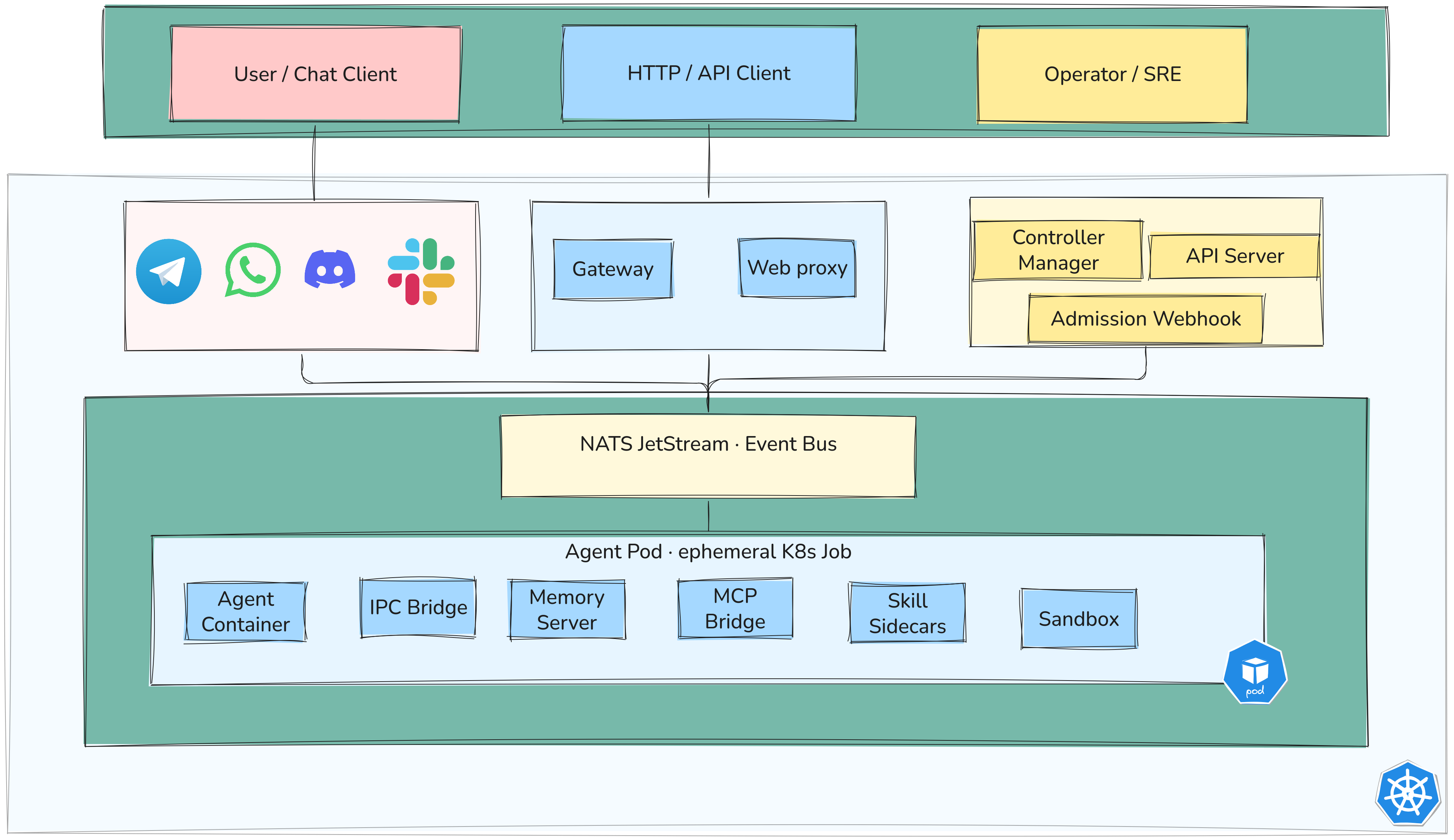
Sympozium follows the standard Kubernetes controller pattern — you declare desired state, controllers reconcile it. On top of that it adds agent-specific needs: message routing, ephemeral execution, memory, and policy enforcement.
Control plane components
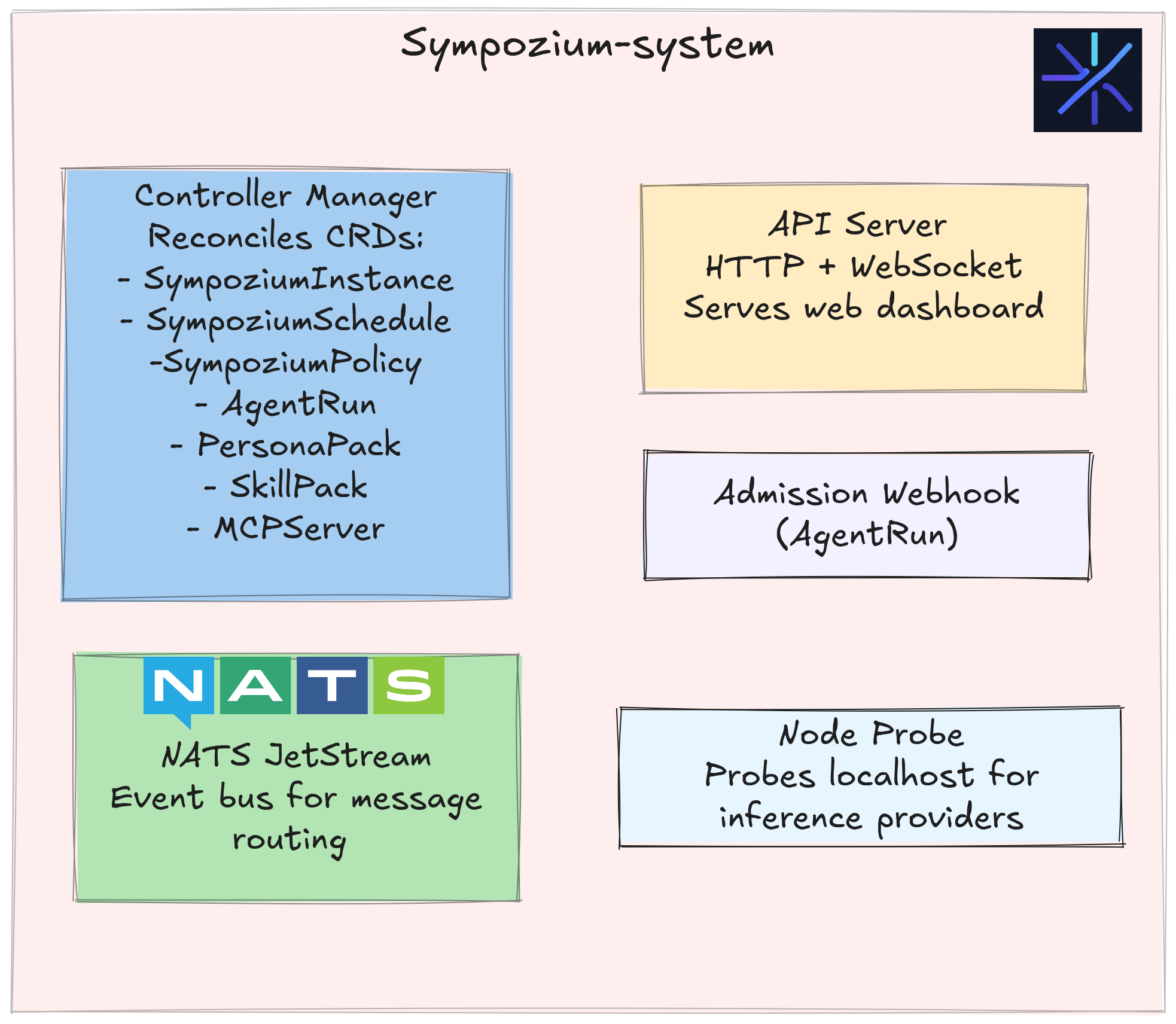
Everything runs in the sympozium-system namespace. Four components work together:
| Component | Role |
|---|---|
| Controller Manager | Reconciles SympoziumInstance, SympoziumSchedule, SympoziumPolicy, AgentRun, PersonaPack, SkillPack, MCPServer CRDs |
| API Server | HTTP and WebSocket interface; serves the web dashboard |
| Admission Webhook | Validates AgentRun objects on creation and update, blocks invalid ones before Kubernetes accepts them |
| NATS JetStream | Event bus — routes messages between channel pods and AgentRun jobs |
Full execution flow
IPC: how sidecars talk to each other
Instead of gRPC or HTTP between containers, Sympozium uses a filesystem-based IPC pattern:
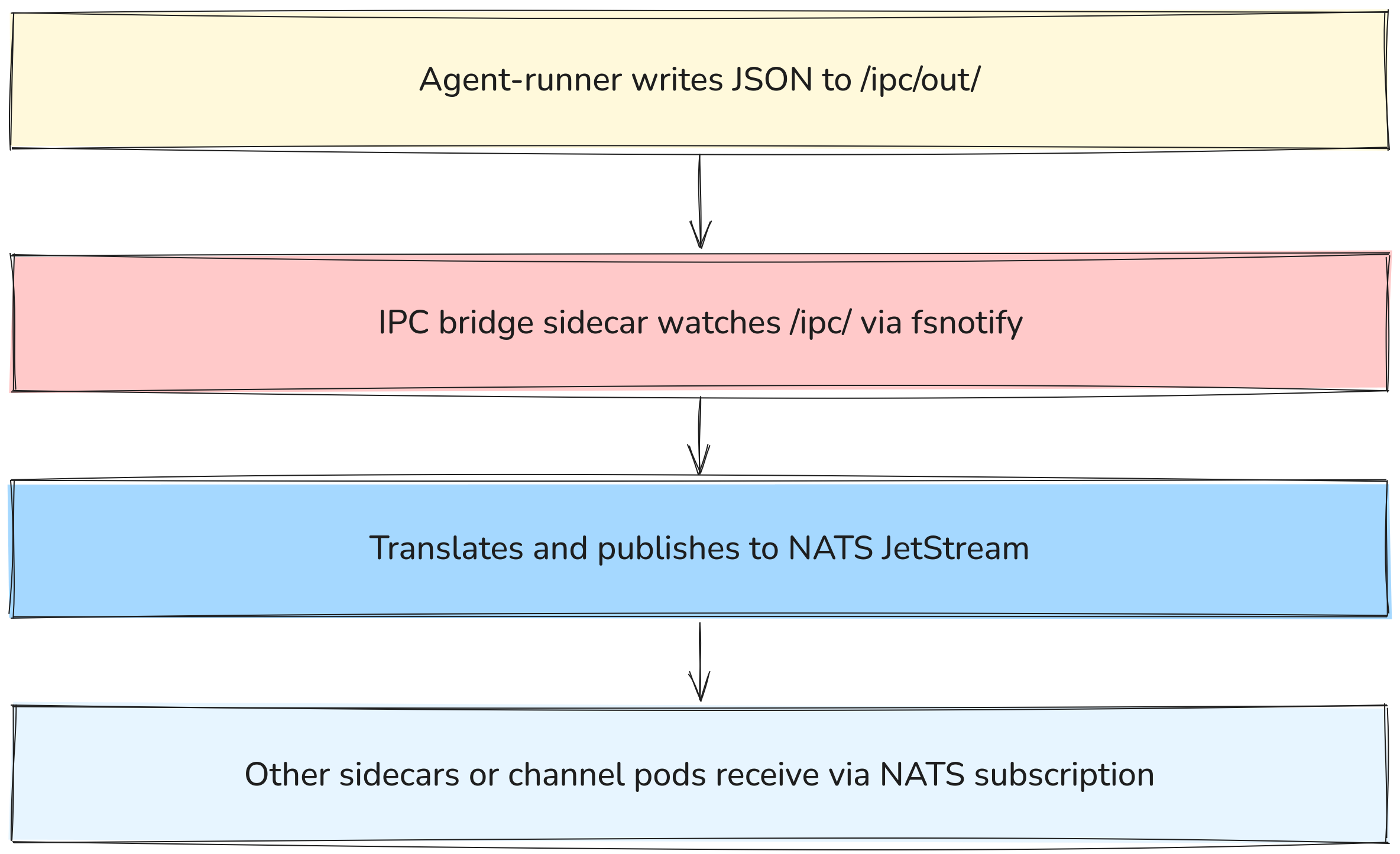
- Agent: produces files
- IPC Bridge: converts files → messages
- NATS: routes messages
- Consumers: process messages
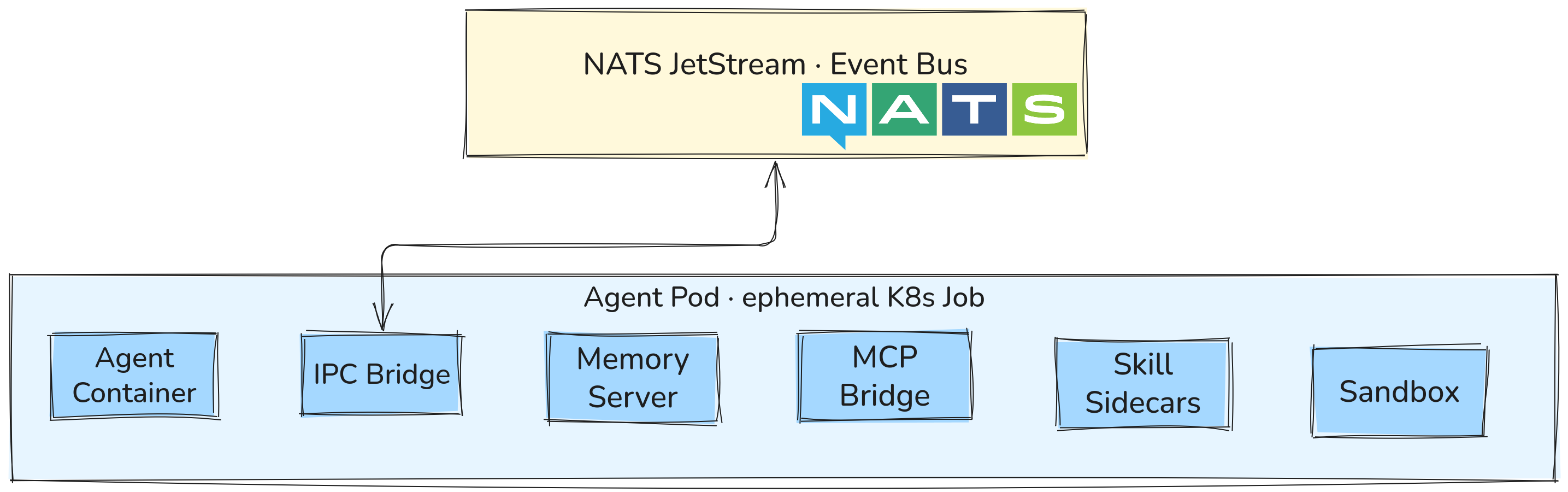
Why this approach? It makes the agent-runner container language-agnostic. Any container that can write a JSON file to a shared volume can participate in the system — no SDK dependency required.
Memory architecture
Each SympoziumInstance gets a dedicated PersistentVolumeClaim named <instance>-memory. The memory sidecar runs alongside the agent-runner and exposes three tools:
| Tool | What it does |
|---|---|
memory_search(query, top_k?) |
Full-text semantic search over past memories |
memory_store(content, tags?) |
Persist a memory with optional tags |
memory_list(tags?, limit?) |
List memories filtered by tags |
The storage engine is SQLite with FTS5 (full-text search). Memory survives across runs since it lives on the PVC. Standard backup tools like Velero work with it.
Policy enforcement
Policies are enforced at admission time by the webhook — not at runtime. This means a policy violation is rejected before the pod is even scheduled, not caught mid-execution.
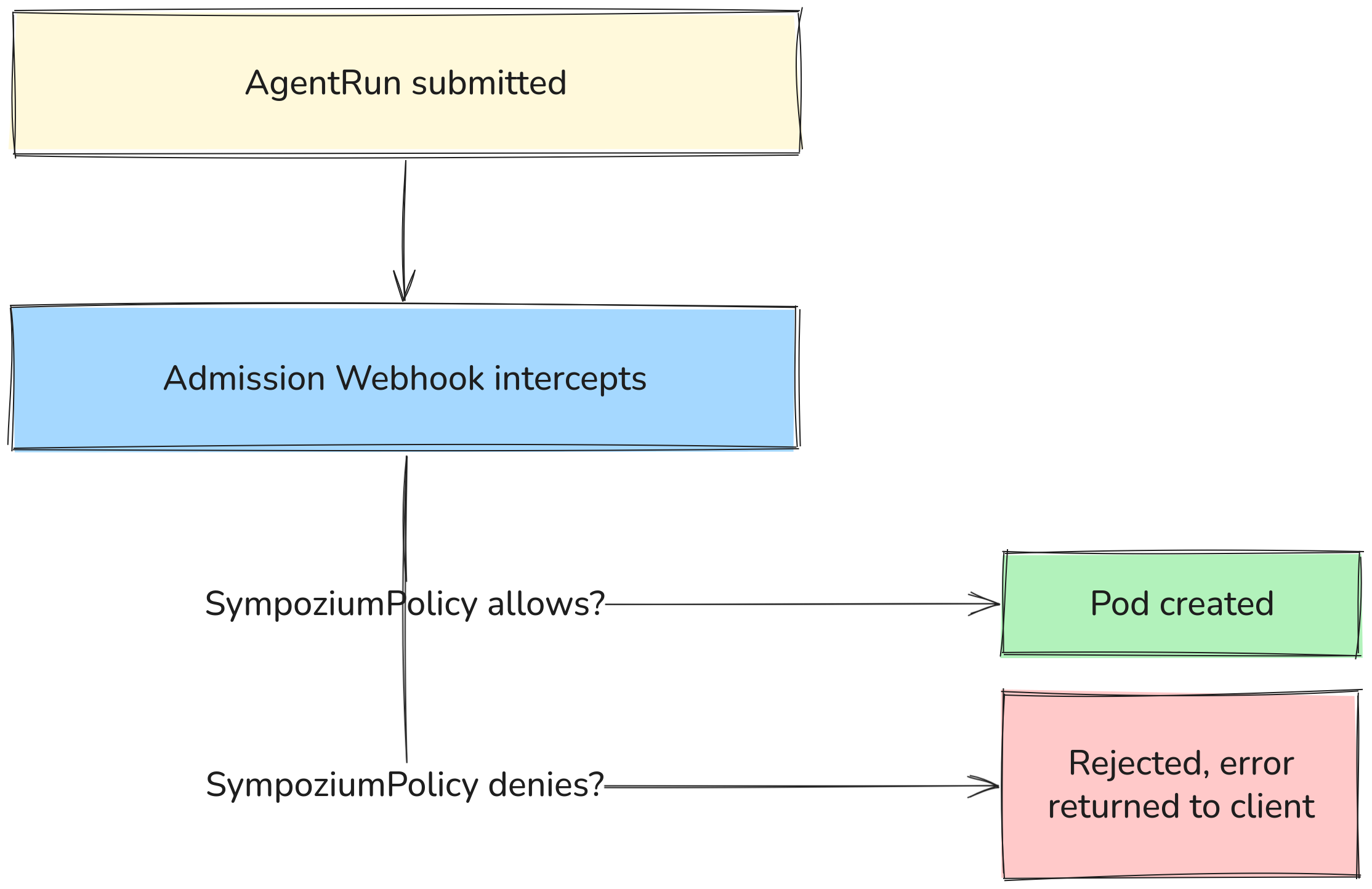
Three built-in templates:
Permissive   → dev environments, everything allowed
Default      → command execution requires approval
Restrictive  → deny-by-default + mandatory sandbox (production)
Network topology
Channels are optional — you can trigger AgentRuns directly via kubectl or the CLI or API without any channel deployment. When channels are used, the flow looks like this:
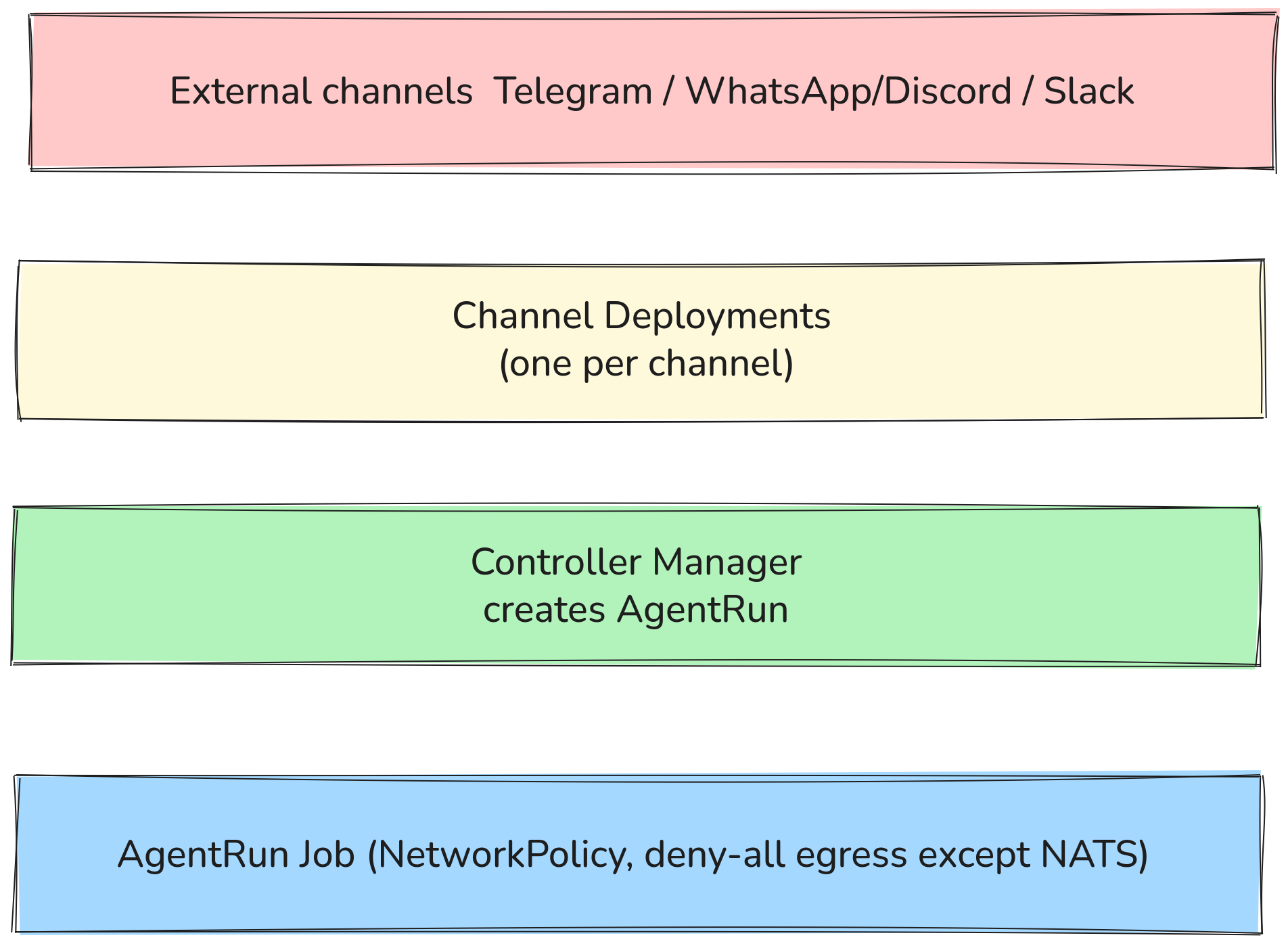
Agent pods cannot reach the internet or other cluster services by default. The only allowed egress is to the IPC bridge which talks to NATS — enforced via NetworkPolicy, not just configuration.
Security model (6 layers)
| Layer | What it does |
|---|---|
| NetworkPolicy deny-all egress | Agents cannot reach the internet; only the IPC bridge can reach NATS |
| Container hardening | runAsNonRoot, UID 1000, read-only root filesystem |
| Kernel sandboxing | Optional gVisor or Kata Containers via runtimeClassName |
| Admission webhooks | SympoziumPolicy gates tool access before the pod is even created |
| Ephemeral RBAC | Role created per AgentRun, deleted when the run finishes |
| Multi-tenancy | Namespace-scoped CRDs + standard Kubernetes RBAC |
Concepts
Sympozium is built around six Kubernetes CRDs. Understanding what each one does and how they relate is the key to using the system effectively.
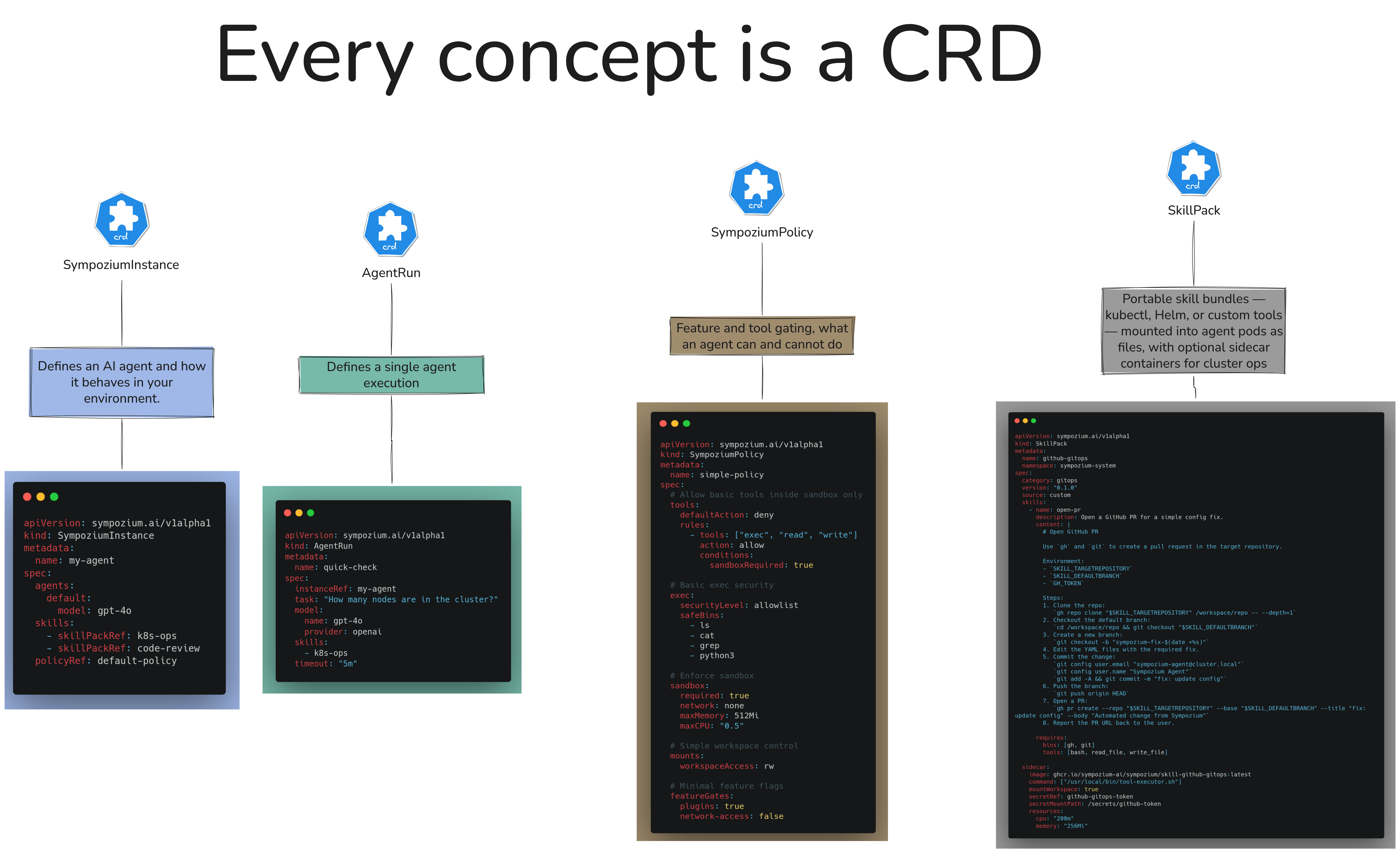
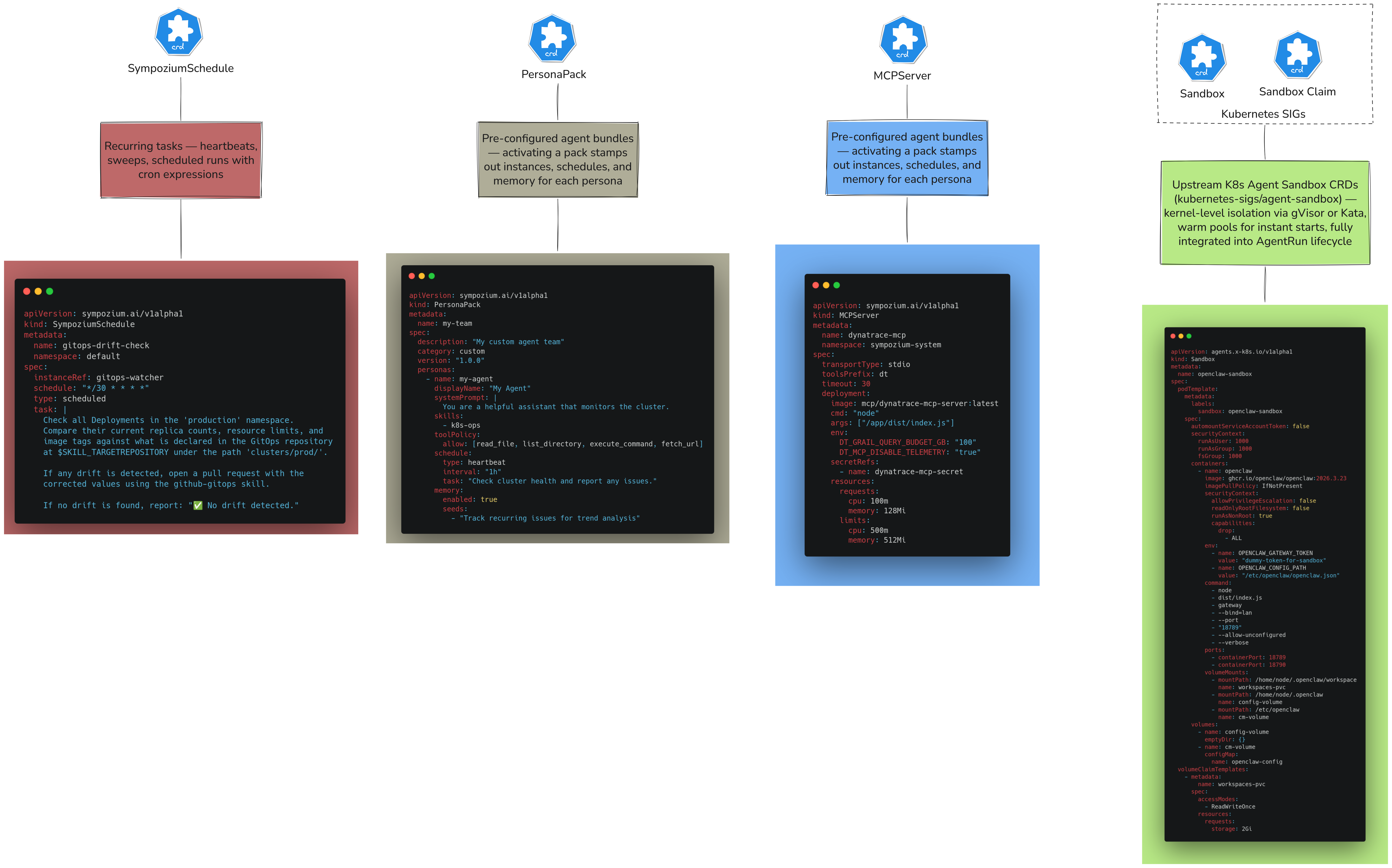
Each CRD has a single responsibility. Here is what each one does and how they relate:
SympoziumInstance
The definition of a single agent — its identity, its LLM provider, its system prompt, and which skills it has access to. Think of it as the “agent profile”. It persists between runs. The actual execution happens in AgentRun jobs that reference this instance.
apiVersion: sympozium.ai/v1alpha1
kind: SympoziumInstance
metadata:
  name: sre-watchdog
  namespace: platform-team
spec:
  provider:
    name: openai
    model: gpt-4o
    apiKeySecret: openai-secret
  systemPrompt: |
    You are an SRE agent. Monitor cluster health, triage alerts,
    and suggest remediation steps. You have read-only access to
    Prometheus metrics and Kubernetes logs.
  skills:
    - sre-observability
  policy: default
Each instance gets its own <instance>-memory PVC automatically.
AgentRun
A single execution of an agent — one message in, one response out. Created automatically by the controller when a message arrives. Each AgentRun becomes a Kubernetes Job.
You can also create AgentRuns manually to trigger an agent programmatically:
apiVersion: sympozium.ai/v1alpha1
kind: AgentRun
metadata:
  name: triage-run-001
  namespace: platform-team
spec:
  instanceRef: sre-watchdog
  input: "Pod crashlooping in namespace payments — investigate and report"
What happens when this is created:
- Admission webhook checks the policy
- Ephemeral RBAC Role is created for this run
- Job pod starts with agent-runner + sidecars
- Run completes, pod deleted, RBAC cleaned up
Status reflects the run outcome:
status:
  phase: Succeeded
  output: "Found OOMKilled events on payments-api-7d9f... memory limit is 128Mi, recommend increasing to 256Mi"
  startTime: "2026-03-31T09:00:00Z"
  completionTime: "2026-03-31T09:00:42Z"
PersonaPack
A bundle that stamps out a complete team of pre-configured agents in one action. Like a Helm chart, but for agent teams. Activating a pack creates all the underlying SympoziumInstance, SympoziumSchedule, and Secret objects automatically — all linked with ownerReferences so deleting the pack cascades cleanly.
apiVersion: sympozium.ai/v1alpha1
kind: PersonaPack
metadata:
  name: my-team
spec:
  description: "My custom agent team"
  category: custom
  version: "1.0.0"
  personas:
    - name: my-agent
      displayName: "My Agent"
      systemPrompt: |
        You are a helpful assistant that monitors the cluster.
      skills:
        - k8s-ops
      toolPolicy:
        allow: [read_file, list_directory, execute_command, fetch_url]
      schedule:
        type: heartbeat
        interval: "1h"
        task: "Check cluster health and report any issues."
      memory:
        enabled: true
        seeds:
          - "Track recurring issues for trend analysis"
SkillPack
A SkillPack defines a sidecar container that gets attached to AgentRun pods, giving the agent access to specific tools. Each skill runs with scoped RBAC — only the permissions it needs, created per-run and deleted when the run ends.
| SkillPack | What it provides | RBAC scope |
|---|---|---|
k8s-ops |
kubectl access — list, describe, exec |
Configurable (namespace or cluster) |
sre-observability |
Prometheus, Loki, Kubernetes metrics and logs | Read-only |
incident-response |
Structured triage, log analysis, rollback runbooks | Read + limited write |
web-endpoint |
Exposes the agent over HTTP | None |
github-gitops |
Git operations, PR creation | Repo-scoped token |
Example — adding k8s-ops to an instance:
spec:
  skills:
    - k8s-ops
  skillConfig:
    k8s-ops:
      namespaces: ["payments", "orders"]
The skill sidecar communicates with the agent-runner via the shared /ipc volume — no direct network call between containers.
SympoziumPolicy
Controls what an agent is allowed to do. Enforced by the admission webhook before the AgentRun pod is created — not at runtime.
Three built-in templates:
# Development — everything allowed
apiVersion: sympozium.ai/v1alpha1
kind: SympoziumPolicy
metadata:
  name: permissive
spec:
  template: Permissive

# Staging — command execution requires human approval
apiVersion: sympozium.ai/v1alpha1
kind: SympoziumPolicy
metadata:
  name: default
spec:
  template: Default
  requireApproval:
    - execute_command

# Production — deny by default, sandbox mandatory
apiVersion: sympozium.ai/v1alpha1
kind: SympoziumPolicy
metadata:
  name: restrictive
spec:
  template: Restrictive
  sandbox:
    enabled: true
    runtimeClass: gvisor
  allowedTools:
    - memory_search
    - memory_store
    - send_channel_message
SympoziumSchedule
Cron-based scheduling for agent runs. Useful for heartbeat health checks, daily audits, cost reports — anything that should run on a schedule rather than on demand.
apiVersion: sympozium.ai/v1alpha1
kind: SympoziumSchedule
metadata:
  name: daily-cost-report
  namespace: devops
spec:
  instanceRef: cost-analyzer
  schedule: "0 9 * * 1-5"   # weekdays at 9am
  input: |
    Generate a daily cost analysis report.
    Identify the top 5 most expensive namespaces and suggest optimizations.
  timezone: "Europe/Paris"
When the schedule fires, the controller creates an AgentRun — same execution path as a manual run. PersonaPacks auto-generate schedules for their agents (health checks every 15 minutes for the SRE Watchdog, for example).
Built-in agent tools
These tools are available to all agents regardless of SkillPack:
| Tool | What it does |
|---|---|
execute_command |
Run a shell command (governed by policy) |
read_file |
Read a file from the container filesystem |
write_file |
Write a file to the container filesystem |
list_directory |
List files in a directory |
send_channel_message |
Send a message back to the originating channel |
fetch_url |
HTTP GET a URL (blocked by NetworkPolicy in Restrictive mode) |
schedule_task |
Create a one-off future AgentRun |
Channels
Channels are how users talk to agents. Each channel is a dedicated Kubernetes Deployment that listens on the external platform, receives messages, and routes them through NATS JetStream to create AgentRuns.
How it works
User sends message on Telegram / WhatsApp / Slack / Discord
        │
        ▼
Channel Deployment (running in sympozium-system)
  - Authenticated connection to external platform
  - Receives incoming messages
        │
        ▼
Publishes to NATS JetStream topic
        │
        ▼
Controller Manager creates AgentRun CR
        │
        ▼
Job pod runs (agent-runner + sidecars)
        │
        ▼
Response published back to NATS
        │
        ▼
Channel Deployment picks up response → sends reply to user
Each channel runs as its own Deployment — independent and can be enabled/disabled separately.
Connecting a channel to a specific agent
Each channel can be bound to a specific SympoziumInstance. You can have multiple channels pointing to different agents:
Telegram bot → sre-watchdog agent
WhatsApp    → customer-support agent
Slack #dev  → developer-team tech-lead agent
Setup
Getting Sympozium running takes three steps: install the CLI, deploy to your cluster, and configure an LLM provider.
Prerequisites
- A running Kubernetes cluster (Kind, minikube, EKS, GKE, AKS — anything works)
kubectlconfigured and pointing at your cluster- An API key from an LLM provider (OpenAI, Anthropic, etc.)
Step 1 — Install the CLI
Homebrew (macOS/Linux):
brew install sympozium-ai/sympozium/sympozium
Shell installer:
curl -fsSL https://deploy.sympozium.ai/install.sh | sh
From source (Go required):
go install github.com/sympozium-ai/sympozium/cmd/sympozium@latest
Verify the install:
sympozium version
Step 2 — Deploy to your cluster
This installs the CRDs, controller manager, NATS JetStream, admission webhook, and API server into the sympozium-system namespace:
sympozium install
Verify everything is running:
kubectl get pods -n sympozium-system
You should see pods for the controller, API server, webhook, and NATS all in Running state.
Alternative: Helm (requires cert-manager):
helm repo add sympozium https://deploy.sympozium.ai/charts
helm repo update
helm install sympozium sympozium/sympozium \
  --namespace sympozium-system \
  --create-namespace
Step 3 — Create your first agent
Store your LLM API key as a Kubernetes secret:
kubectl create secret generic openai-secret \
  --from-literal=apiKey=sk-... \
  --namespace default
Create a SympoziumInstance:
apiVersion: sympozium.ai/v1alpha1
kind: SympoziumInstance
metadata:
  name: my-first-agent
  namespace: default
spec:
  provider:
    name: openai
    model: gpt-4o
    apiKeySecret: openai-secret
  systemPrompt: |
    You are a helpful assistant running on Kubernetes.
    Answer questions clearly and concisely.
  policy: permissive
kubectl apply -f my-agent.yaml
Step 4 — Run the agent
Trigger a run manually:
kubectl apply -f - <<EOF
apiVersion: sympozium.ai/v1alpha1
kind: AgentRun
metadata:
  name: test-run-001
  namespace: default
spec:
  instanceRef: my-first-agent
  input: "What is the current date and Kubernetes version?"
EOF
Watch the run:
kubectl get agentrun test-run-001 -w
View the output:
kubectl describe agentrun test-run-001
Step 5 — Open the dashboard
sympozium serve
Opens the web dashboard at http://127.0.0.1:8080. From here you can manage instances, view run history, edit policies, and activate PersonaPacks.
Or use the TUI:
sympozium
Step 6 — Activate a PersonaPack (optional)
To deploy a full pre-built agent team in one command:
kubectl create secret generic anthropic-secret \
  --from-literal=apiKey=sk-ant-... \
  --namespace platform-team

kubectl apply -f - <<EOF
apiVersion: sympozium.ai/v1alpha1
kind: PersonaPack
metadata:
  name: my-team
spec:
  description: "My custom agent team"
  category: custom
  version: "1.0.0"
  personas:
    - name: my-agent
      displayName: "My Agent"
      systemPrompt: |
        You are a helpful assistant that monitors the cluster.
      skills:
        - k8s-ops
      toolPolicy:
        allow: [read_file, list_directory, execute_command, fetch_url]
      schedule:
        type: heartbeat
        interval: "1h"
        task: "Check cluster health and report any issues."
      memory:
        enabled: true
        seeds:
          - "Track recurring issues for trend analysis"EOF
This creates Security Guardian, SRE Watchdog, and Platform Engineer agents — all pre-configured with the right skills, schedules, and memory seeds.
Upgrading
sympozium upgrade
Or with Helm:
helm upgrade sympozium sympozium/sympozium --namespace sympozium-system
Final thoughts
Kagent and Sympozium are not competing for the same space. Kagent is the right choice when you need to bring existing agent frameworks — LangGraph, CrewAI, Google ADK — into Kubernetes with minimal friction, or when A2A protocol and standard interoperability matter.
Sympozium takes a different bet: that running agents as ephemeral, isolated Jobs — governed by CRDs, policies, and scoped RBAC — is not just a deployment detail, but the correct model for production AI workloads. The same principles that made Kubernetes the standard for containerized services apply here: declarative state, isolation by default, and policy enforcement at the platform level rather than in application code.
That architecture — every agent a Pod, every policy a CRD, every execution a Job — feels less like an opinionated framework choice and more like where the ecosystem is heading. It maps directly onto how platform teams already think about security, multi-tenancy, and operational control.
Whether Sympozium becomes the standard or just an early signal, the direction it points is worth paying attention to.
References
- Website: sympozium.ai
- GitHub: sympozium-ai/sympozium
- Docs: deploy.sympozium.ai/docs
- Container:
ghcr.io/sympozium-ai/sympozium/agent-runner:v0.8.0 - Created by the author of k8sgpt