
Building a Modern On-Premises OpenShift Platform
A while back, a customer came to us with a familiar tension: they wanted the speed of the cloud — self-service, automation, ship whenever you’re ready — but their data wasn’t allowed to leave the building. Regulated industry, strict sovereignty rules, auditors who ask hard questions.
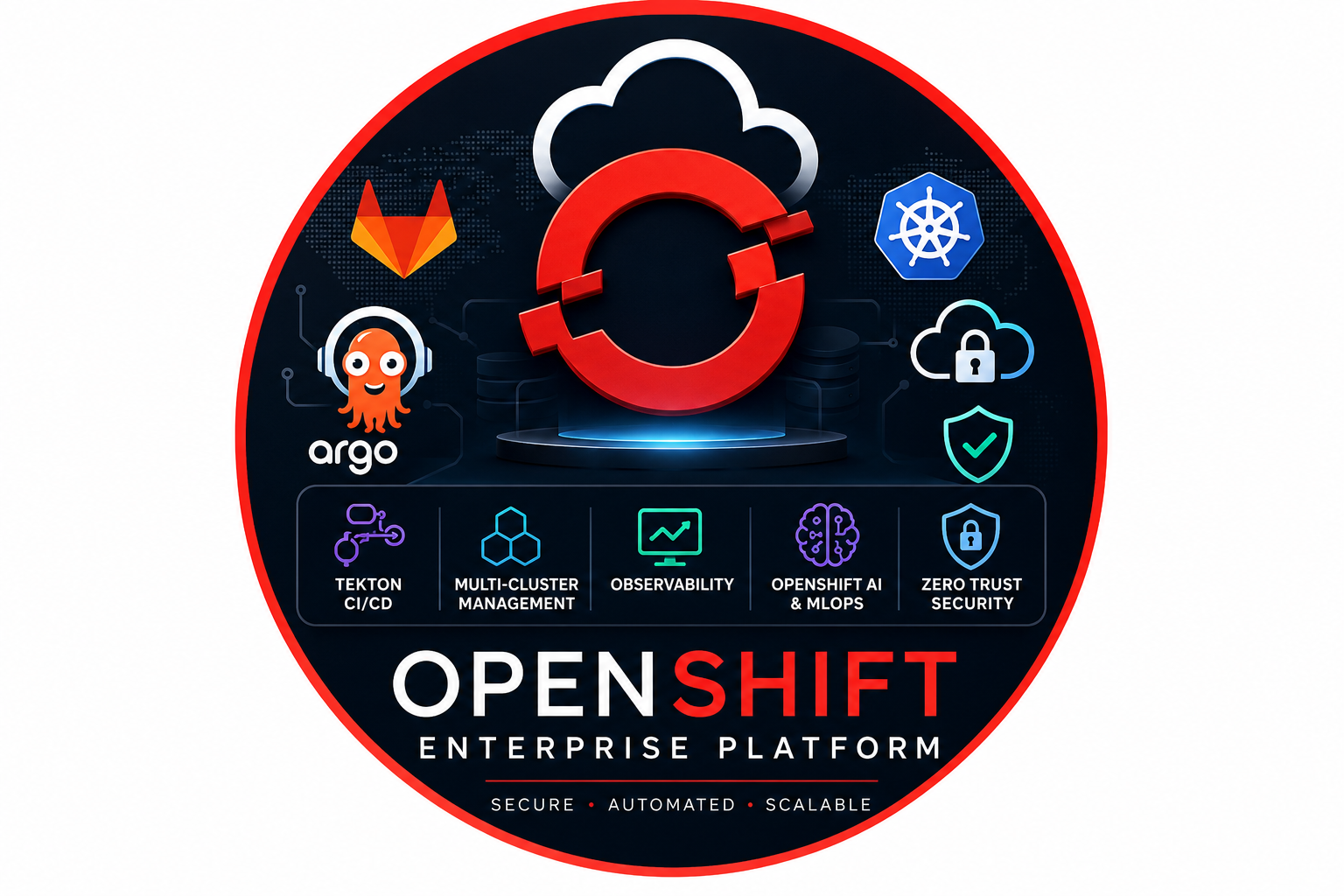
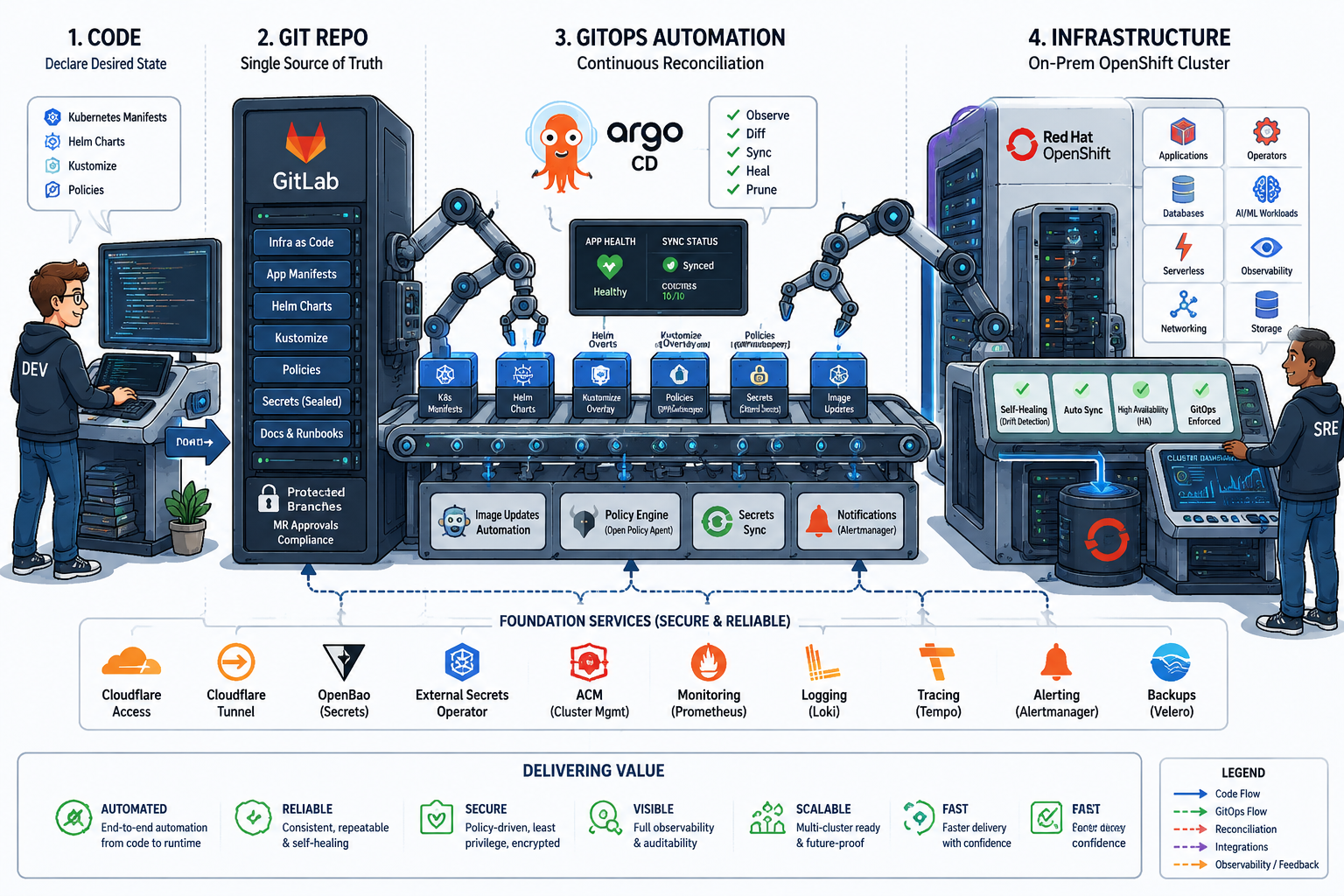
So we built them an OpenShift platform that lives entirely inside their own datacenter, yet still feels like a modern cloud to the people using it. GitOps, CI/CD, single sign-on, observability, multi-cluster governance, even model serving for the data-science team — all of it running on hardware they own and control.
This post walks through how the pieces fit together, and why we made the calls we did along the way.
1. Why OpenShift Instead of Plain Kubernetes?
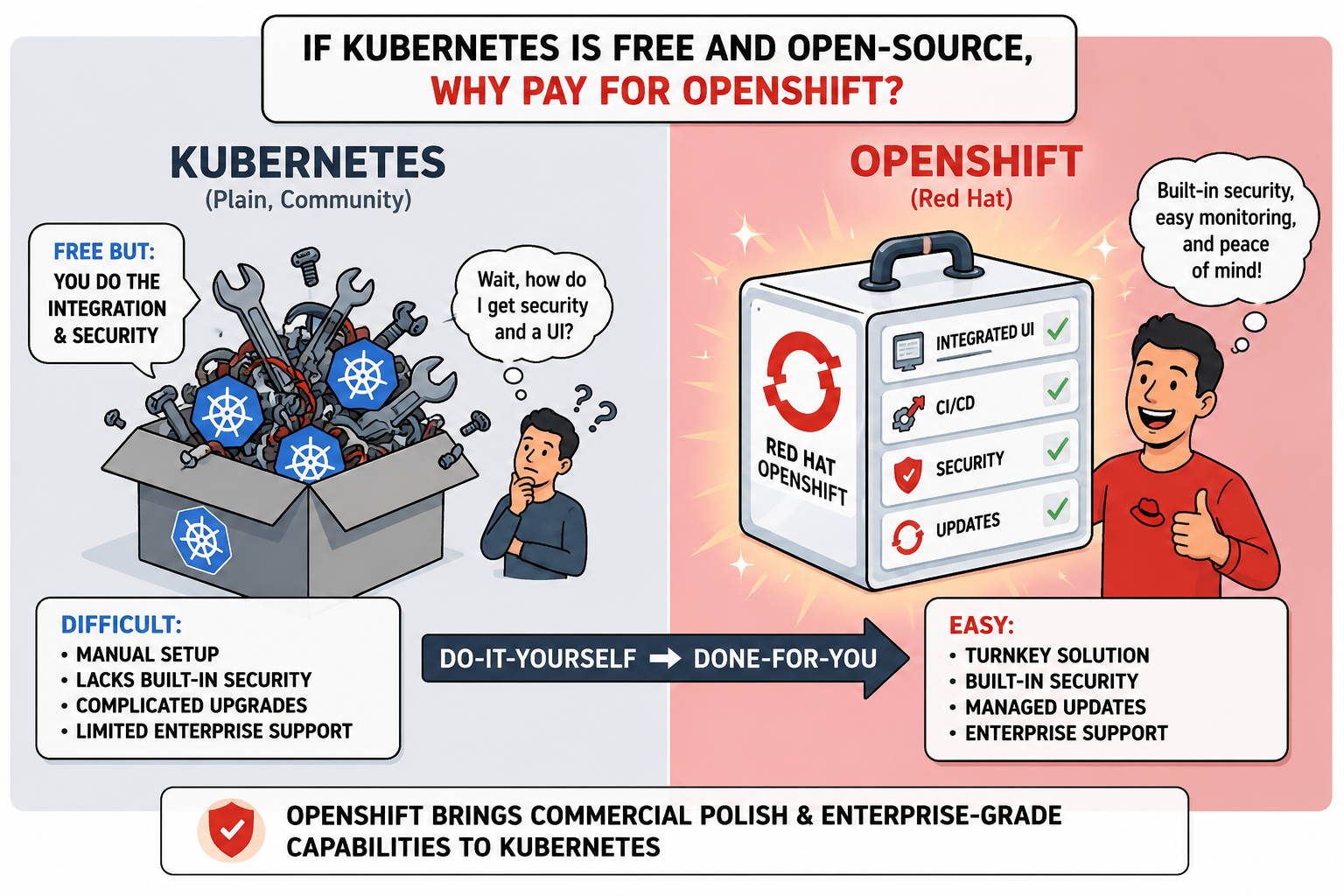
We get asked this a lot: why not just run upstream Kubernetes and skip the licensing? It’s a fair question, and for a small team with deep Kubernetes muscle it can be the right answer. But on a platform that several teams lean on, the work doesn’t stop at kubectl apply. Someone still has to wire in authentication, monitoring, logging, a registry and an upgrade path — and then keep all of it patched, forever. OpenShift ships those pieces already integrated and supported, which means our time goes into the platform we’re building instead of the plumbing under it.
Here’s how the two compare in the day-to-day:
| Capability | Kubernetes | OpenShift |
|---|---|---|
| Installation | Manual or distribution-dependent | Automated and enterprise-supported |
| Security | Add-ons required | Built-in SCC, integrated OAuth, security policies |
| Monitoring | Third-party stack required | Integrated Prometheus stack |
| Logging | Third-party stack required | OpenShift Logging / Loki |
| CI/CD | External tooling | OpenShift Pipelines / Tekton |
| GitOps | External install | OpenShift GitOps / Argo CD |
| Operators | Optional | Native OLM ecosystem |
| Upgrades | Manual planning | CVO-managed lifecycle |
| Support | Community/vendor-dependent | Red Hat enterprise support |
2. CI/CD with Tekton Pipelines
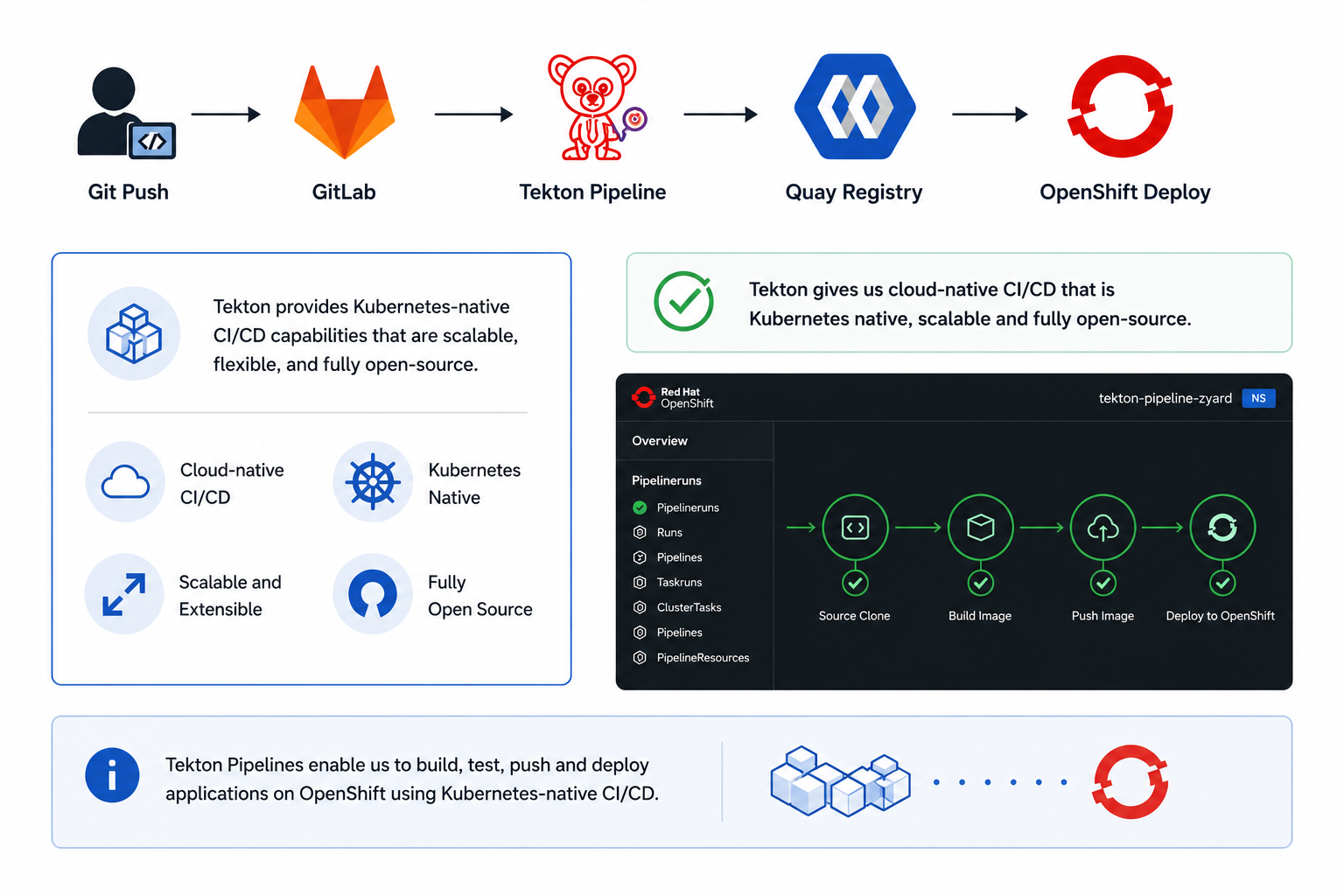
Our build pipelines run on Tekton, so CI/CD is just more Kubernetes — same API, same RBAC, same kubectl, no separate build server to babysit. The flow itself is the one you’d expect: pull the code, build the image, push it to the registry, roll it out to the cluster.
apiVersion: tekton.dev/v1
kind: Pipeline
metadata:
  name: build-and-deploy
  namespace: cicd
spec:
  workspaces:
    - name: shared-workspace

  tasks:
    - name: clone-source
      taskRef:
        name: git-clone
      workspaces:
        - name: output
          workspace: shared-workspace

    - name: build-and-push
      runAfter:
        - clone-source
      taskRef:
        name: buildah
      workspaces:
        - name: source
          workspace: shared-workspace

    - name: deploy-to-openshift
      runAfter:
        - build-and-push
      taskRef:
        name: openshift-client
Example PipelineRun:
apiVersion: tekton.dev/v1
kind: PipelineRun
metadata:
  generateName: build-and-deploy-
  namespace: cicd
spec:
  pipelineRef:
    name: build-and-deploy
  workspaces:
    - name: shared-workspace
      persistentVolumeClaim:
        claimName: pipeline-workspace
3. GitOps with Argo CD
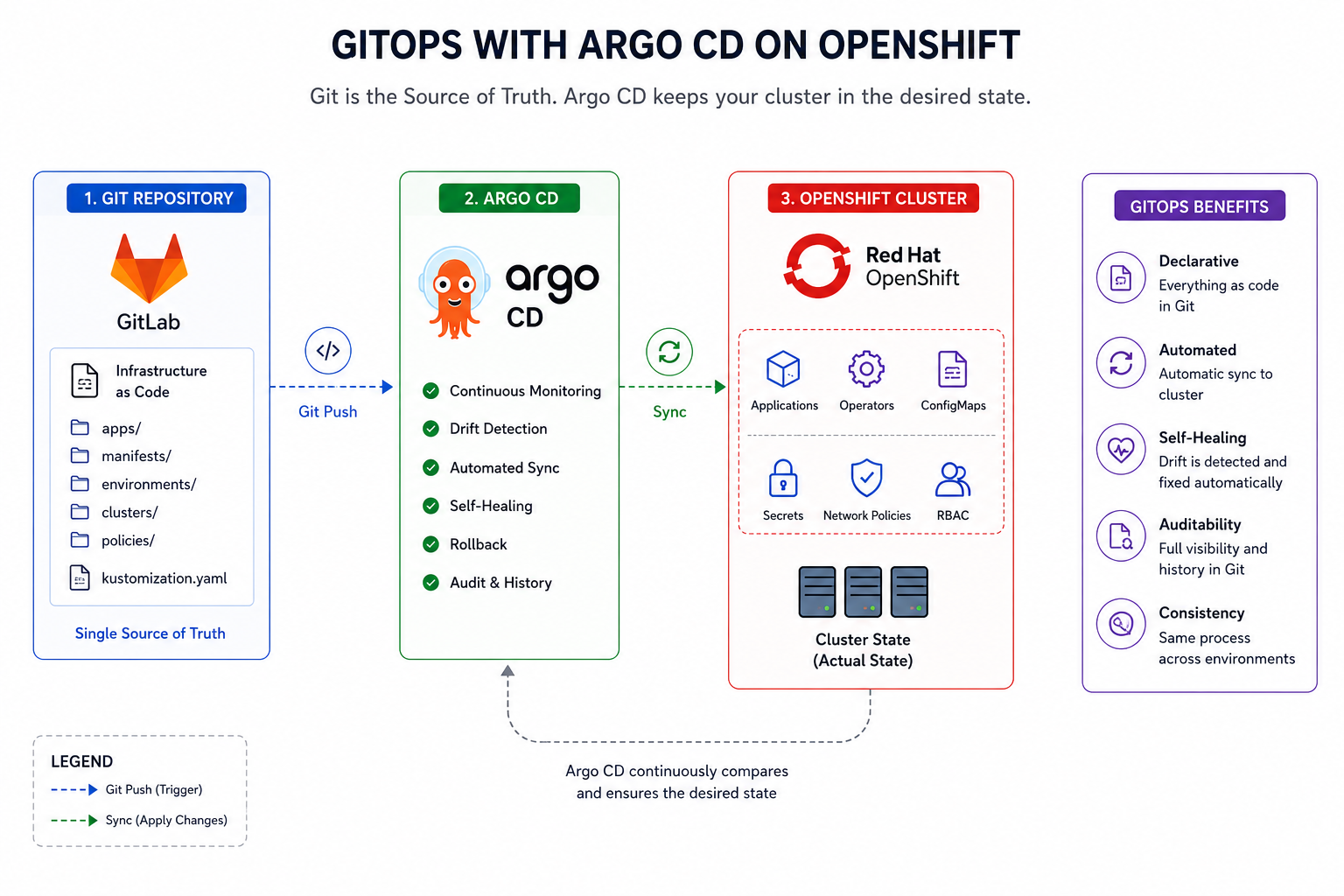
From there, Git takes over as the source of truth. Argo CD keeps an eye on both the repository and the cluster at the same time, and whenever the two drift apart it quietly pulls the cluster back in line with what’s in Git.
apiVersion: argoproj.io/v1alpha1
kind: Application
metadata:
  name: platform-monitoring
  namespace: openshift-gitops
spec:
  project: default

  source:
    repoURL: https://gitlab.example.com/platform/gitops.git
    targetRevision: main
    path: clusters/production/monitoring

  destination:
    server: https://kubernetes.default.svc
    namespace: openshift-monitoring

  syncPolicy:
    automated:
      prune: true
      selfHeal: true
The payoff is mostly peace of mind. Nobody touches production by hand, so there are no mystery edits to reverse-engineer at 2 a.m. When something does look off, the Git history says exactly what changed and when — and rolling back is a git revert, not a rescue mission. Because the same manifests rebuild the same environment every time, audits turn into a fairly boring afternoon, which is the highest compliment we can pay them.
4. Multi-Cluster Management with ACM
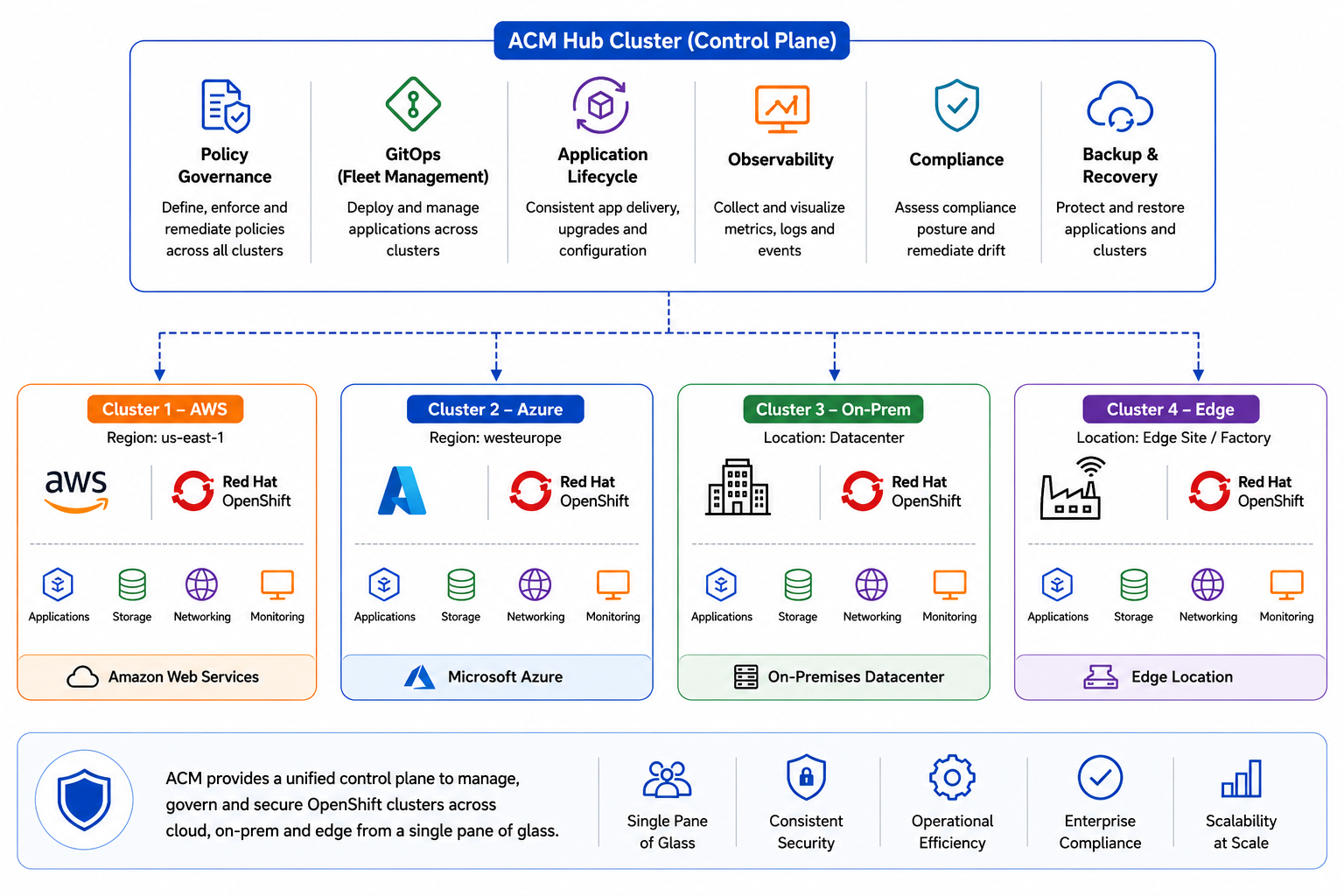
One cluster is easy. The trouble starts at three or four, when each one quietly grows its own snowflake config and you lose track of which is which. Red Hat Advanced Cluster Management gives us a single control plane over all of them — the on-prem clusters alongside whatever runs in the public cloud:
- AWS
- Azure
- On-Premises datacenter
- Edge location
- DR site
Example MultiClusterHub:
apiVersion: operator.open-cluster-management.io/v1
kind: MultiClusterHub
metadata:
  name: multiclusterhub
  namespace: open-cluster-management
spec:
  availabilityConfig: High
Example governance policy:
apiVersion: policy.open-cluster-management.io/v1
kind: Policy
metadata:
  name: restrict-image-registries
  namespace: policies
spec:
  remediationAction: enforce
  disabled: false
  policy-templates:
    - objectDefinition:
        apiVersion: policy.open-cluster-management.io/v1
        kind: ConfigurationPolicy
        metadata:
          name: restrict-image-registries
        spec:
          remediationAction: enforce
          severity: high
          object-templates:
            - complianceType: musthave
              objectDefinition:
                apiVersion: config.openshift.io/v1
                kind: Image
                metadata:
                  name: cluster
                spec:
                  registrySources:
                    allowedRegistries:
                      - registry.redhat.io
                      - quay.io
                      - image-registry.openshift-image-registry.svc:5000
The governance side is what we lean on most. A policy written once on the hub is enforced everywhere, so a rule like “only pull images from registries we actually trust” can’t quietly lapse on the one cluster nobody’s looking at this week.
5. Why Everything Is Managed as Operators and Code
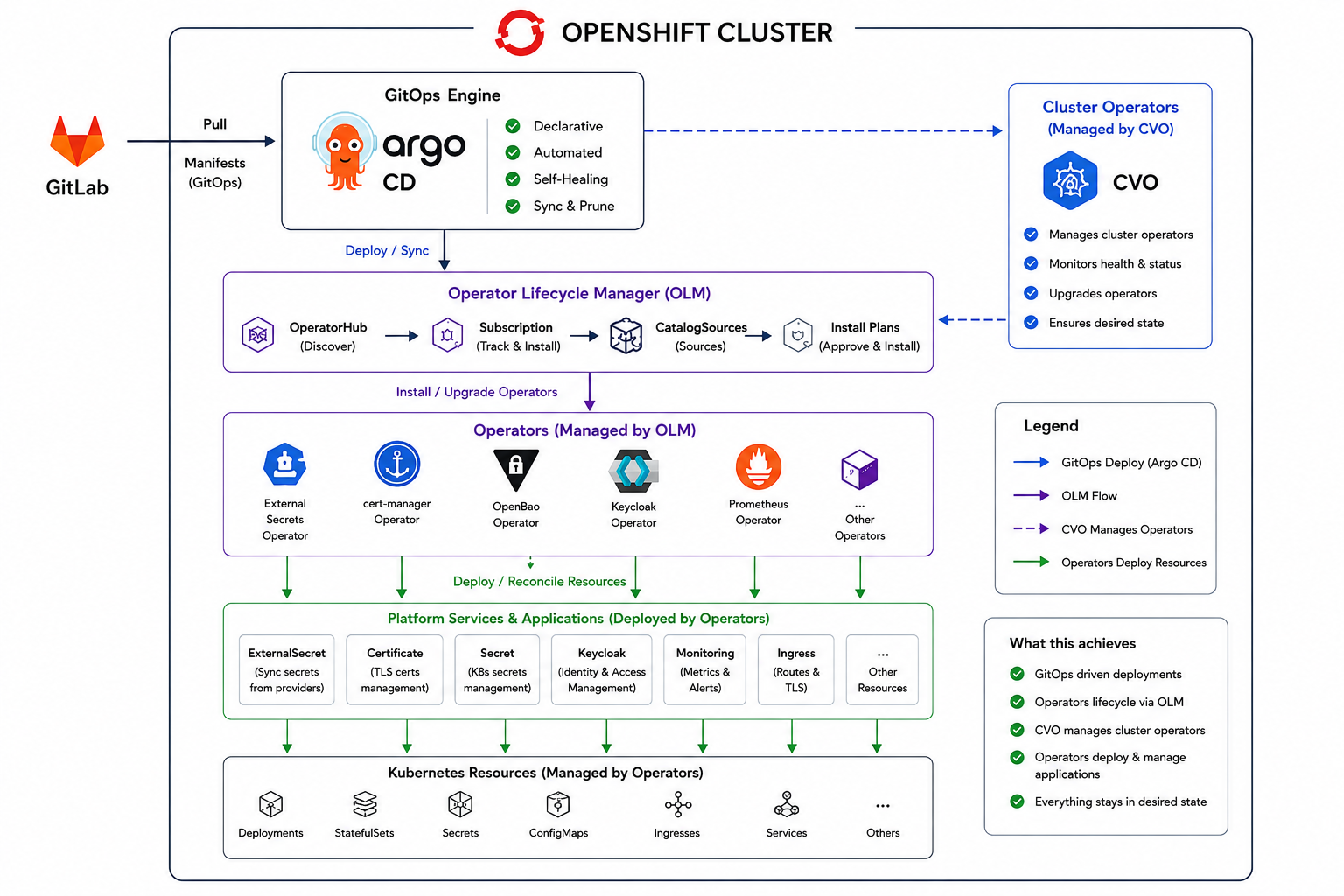
Early on we set ourselves one rule: nothing gets installed by hand. Every capability on the platform is described as code and reconciled by something — Argo CD for our own workloads, the Operator Lifecycle Manager (OLM) for the operators, and the Cluster Version Operator (CVO) for OpenShift’s own components. The operators then take it from there, quietly managing the day-two details of the things they own.
Example operator subscription:
apiVersion: operators.coreos.com/v1alpha1
kind: Subscription
metadata:
  name: openshift-pipelines-operator
  namespace: openshift-operators
spec:
  channel: latest
  name: openshift-pipelines-operator-rh
  source: redhat-operators
  sourceNamespace: openshift-marketplace
  installPlanApproval: Automatic
It sounds strict, and it is. But the alternative — a wiki page titled “How to install X” that went stale two versions ago — is exactly how platforms rot. With everything declared, a rebuild is reproducible, upgrades stop being adventures, and when someone asks who changed what, the answer is already sitting in the commit log.
6. OpenShift AI and MLOps
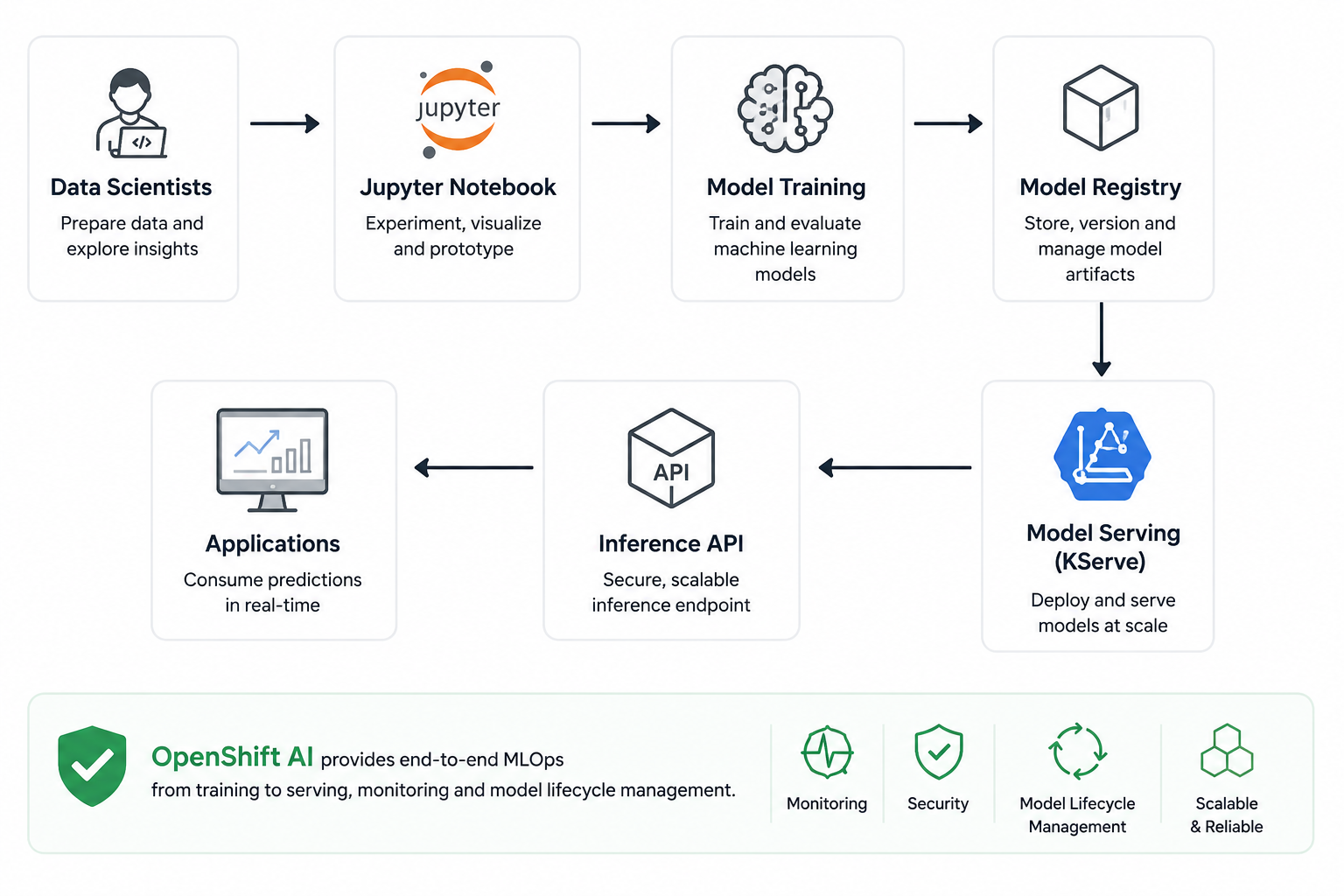
The data-science team used to hand us a model file and a hopeful look; getting it actually served in production was a small project of its own. OpenShift AI shortened that path a lot. They keep developing in notebooks like before, then serve the model through KServe with a short manifest — no bespoke Flask app, no hand-rolled container, no ticket to us in the middle.
Example InferenceService:
apiVersion: serving.kserve.io/v1beta1
kind: InferenceService
metadata:
  name: fraud-detection
  namespace: ai
spec:
  predictor:
    model:
      modelFormat:
        name: sklearn
      storageUri: s3://models/fraud-detection
    resources:
      limits:
        cpu: "2"
        memory: 4Gi
7. Observability Stack
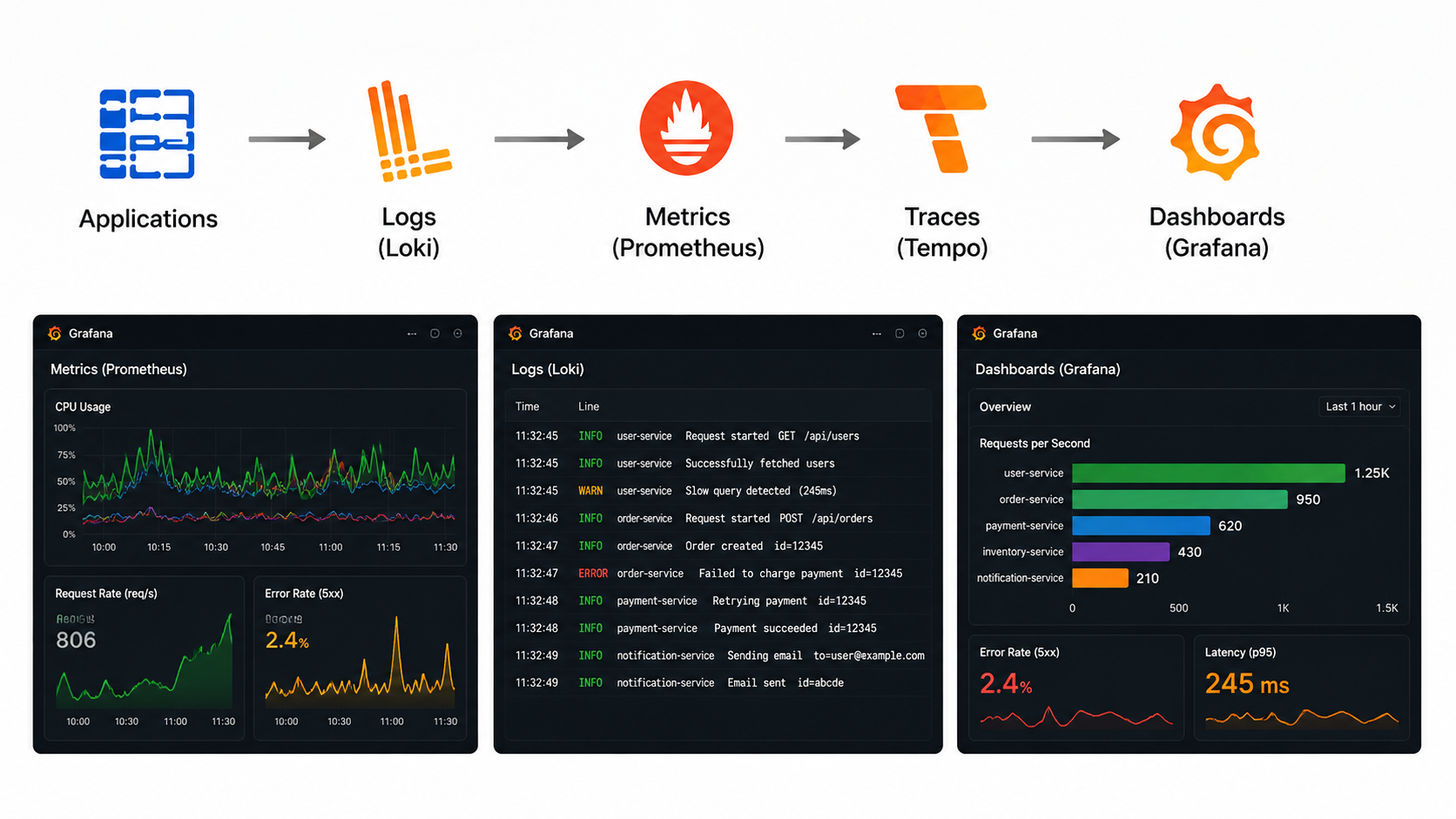
You can’t operate what you can’t see, so observability went in on day one rather than after the first ugly outage. The stack is the usual open-source crew, each piece doing one job well:
- Prometheus for metrics
- Loki for logs
- Tempo for traces
- Grafana for dashboards (deployed with the Grafana Operator)
- Alertmanager for alerts
- Thanos for long-term metrics storage
Example ServiceMonitor:
apiVersion: monitoring.coreos.com/v1
kind: ServiceMonitor
metadata:
  name: application-monitor
  namespace: monitoring
spec:
  selector:
    matchLabels:
      app: myapp
  endpoints:
    - port: http
      path: /metrics
      interval: 30s
8. Zero Trust Access with Cloudflare
Nothing on this platform is reachable from the open internet. There are no public load balancers and no inbound ports to scan, which already removes a whole category of problems.
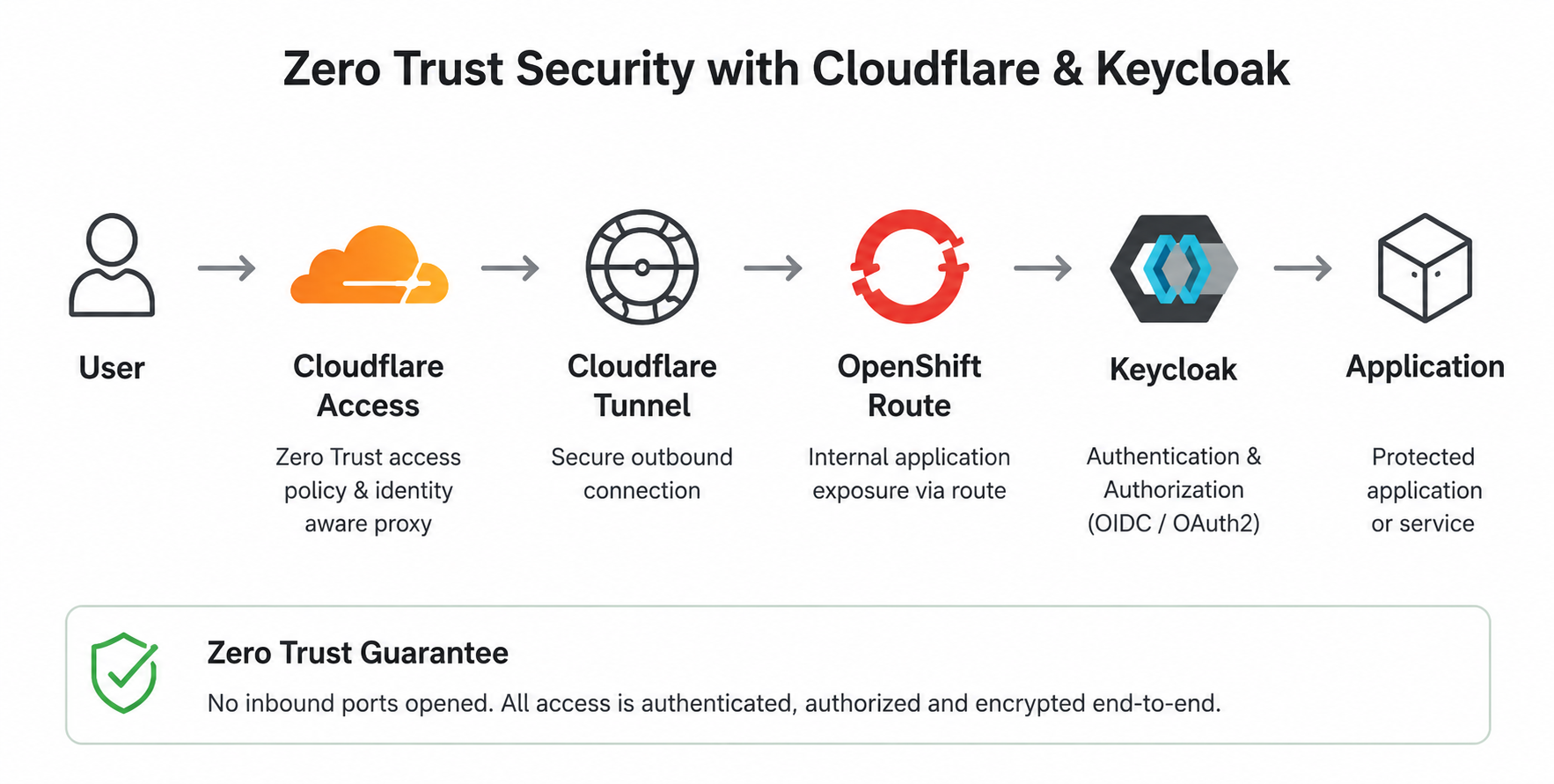
Instead, a cloudflared tunnel dials out to Cloudflare, and every request comes back in through Cloudflare Access, which handles SSO and MFA before traffic ever reaches a pod. If you’re not authenticated, you don’t even get to knock.
Network isolation is only half the story, though. Inside the cluster, OpenShift constrains how workloads run through Security Context Constraints (SCCs) — no privileged containers, no privilege escalation, no host namespaces, and capabilities dropped by default. So even a container that gets compromised has very little room to move.
apiVersion: security.openshift.io/v1
kind: SecurityContextConstraints
metadata:
  name: leminnov-restricted
allowPrivilegedContainer: false
allowPrivilegeEscalation: false
allowHostNetwork: false
allowHostPID: false
allowHostIPC: false
readOnlyRootFilesystem: false

requiredDropCapabilities:
  - ALL

runAsUser:
  type: MustRunAsRange

seLinuxContext:
  type: MustRunAs

fsGroup:
  type: MustRunAs

supplementalGroups:
  type: RunAsAny
Network Policies enforce communication boundaries between workloads and namespaces. Because Cloudflare Tunnel terminates at the in-cluster cloudflared pod rather than at an exposed inbound port, application traffic originates from that pod. The policy below therefore admits ingress only from the cloudflared workload, not from external IP ranges.
Example NetworkPolicy:
apiVersion: networking.k8s.io/v1
kind: NetworkPolicy
metadata:
  name: allow-cloudflared-ingress
  namespace: myapp
spec:
  podSelector:
    matchLabels:
      app: myapp
  policyTypes:
    - Ingress
  ingress:
    - from:
        - namespaceSelector:
            matchLabels:
              kubernetes.io/metadata.name: cloudflare
          podSelector:
            matchLabels:
              app: cloudflared
      ports:
        - protocol: TCP
          port: 8080
No single one of these layers is enough on its own. Put together — no inbound exposure, authenticated access, tightly constrained workloads, and network paths spelled out explicitly — they mean one mistake rarely turns into a breach. That’s really the whole point.
Lessons that stuck
If we had to boil the whole project down to a few things we’d tell our past selves, it’s these three.
Declare everything. Anything installed by hand will drift, and it’ll pick the worst possible moment to break. Lean on operators — they turn the tedious, error-prone parts of lifecycle management into someone else’s solved problem, and that someone is usually Red Hat. And treat Git as the operating model rather than just a place to park YAML: it’s the audit trail, the rollback button and the single version of the truth, all at once. None of this is glamorous, but it’s what lets a small team run a serious platform without living in firefighting mode.
Conclusion
In the end, what we delivered isn’t really “an OpenShift cluster” — it’s a way of working. The teams that use it ship faster because the boring parts are automated, and they sleep better because the guardrails are real, not a slide. It happens to live in a private datacenter, but day to day it doesn’t feel like it.
If you’re caught in the same tug-of-war between control and speed, that’s exactly the kind of thing we enjoy building. Come talk to us — we’re happy to compare notes.
LEMINNOV
Cloud Native • OpenShift • DevSecOps • AI • Platform Engineering