
Terranetes: Running Terraform Inside Kubernetes
Developers need cloud resources an S3 bucket for uploads, a managed database for a new microservice, a message queue for event processing. The Terraform modules already exist. The infrastructure patterns are well-defined. But the provisioning path still looks like this: open a ticket, wait for a platform engineer, schedule a review, merge the PR, hope nothing drifts before the next audit.
Meanwhile, the application side of the house ships multiple times a day through GitOps. The gap between “I need a database” and “here is your database” can be days not because the work is hard, but because the process was never designed for self-service.
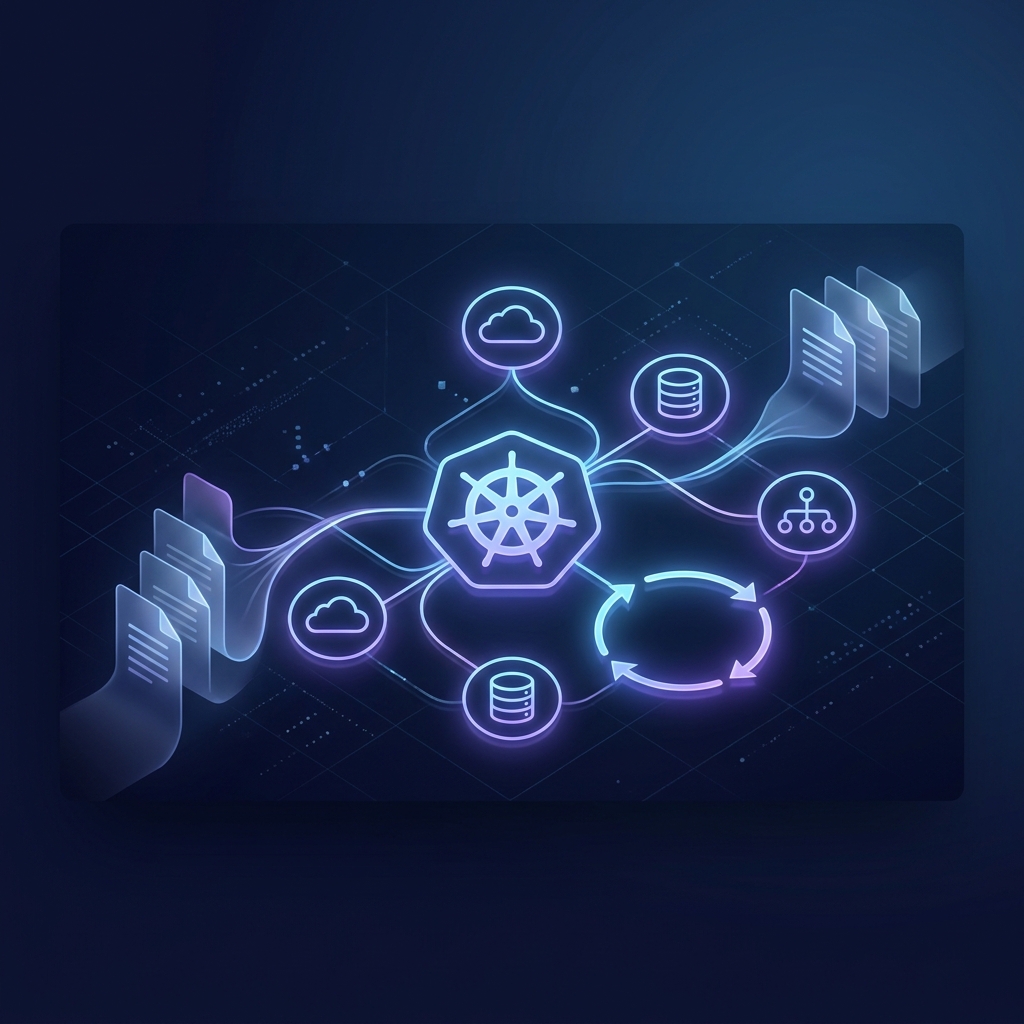
That’s the problem Terranetes solves. It takes Terraform and OpenTofu the tools your platform team already uses and runs them directly inside Kubernetes, exposed as native Custom Resources. Developers apply a manifest. The controller handles the rest: credential injection, policy validation, plan generation, approval gates, and output delivery as Kubernetes Secrets.
No Terraform CLI on developer laptops. No cloud credentials in CI/CD variables. No manual state management.
What Is Terranetes?
Terranetes Controller is a Kubernetes-native infrastructure orchestrator built by Appvia. It is listed in the CNCF Landscape under Cloud Infrastructure Provisioning.
| Attribute | Details |
|---|---|
| Creator | Appvia |
| License | GPL-2.0 |
| Codebase | Go (Kubernetes Controller runtime) |
| GitHub | appvia/terranetes-controller |
| Website | terranetes.appvia.io |
| CNCF Status | Listed in CNCF Landscape |
The core idea is straightforward: instead of running terraform plan and terraform apply from a CI/CD runner or a developer’s machine, Terranetes runs them inside isolated pods within the cluster orchestrated by a Kubernetes controller that watches Custom Resources and reconciles infrastructure state automatically.
The Problem It Solves
Traditional infrastructure provisioning in a Kubernetes-centric environment creates friction at every stage. The table below shows how Terranetes changes each phase:
| Provisioning Phase | Traditional Pipeline | Terranetes Orchestration |
|---|---|---|
| Developer Interface | Writing HCL code directly; managing state backends | Applying simple Kubernetes manifests (Configuration CRs) |
| Credential Security | Cloud keys injected into CI/CD runners or runner VMs | Keys stored in terraform-system namespace; never exposed to developers |
| Compliance Checking | Running linters in pipelines; manual pull request reviews | Automated Checkov validation built into the reconciliation loop |
| Cost Visibility | No visibility until the monthly bill arrives | Infracost analysis exposes cost estimations directly in resource statuses |
| Outputs Consumption | Extracting Terraform outputs and converting to app config | Automatic export of outputs to native Kubernetes Secrets |
The result: developers get self-service infrastructure in minutes. Platform teams keep full control over what gets provisioned, how credentials are managed, and which modules are allowed.
Architecture
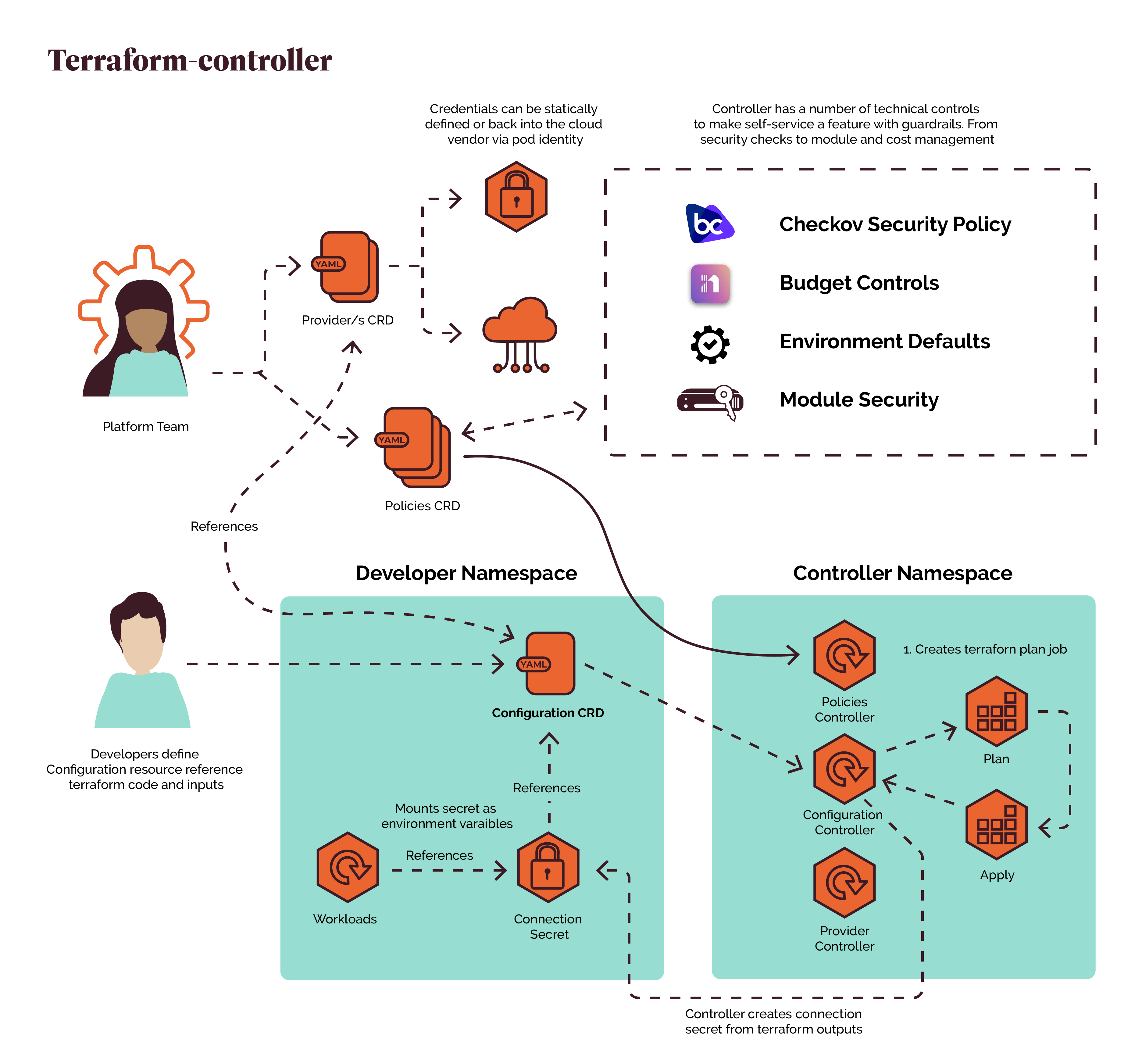
Terranetes divides the system into three logical domains, each with a clear boundary of responsibility.
1. Platform Team
The Platform Team is responsible for defining and governing the infrastructure platform. They create and maintain:
- Provider CRDs that define cloud providers (AWS, Azure, GCP) and securely reference cloud credentials.
- Policy CRDs that enforce organizational guardrails security scanning (Checkov), budget limitations, approved modules, and environment defaults.
These resources are cluster-scoped and shared across developer namespaces.
2. Developer Namespace
Developers never execute Terraform directly.
Instead, they create a Configuration Custom Resource describing the infrastructure they want. A Configuration typically contains:
- The infrastructure module to deploy
- Input variables
- A reference to an approved Provider
- The name of the output Kubernetes Secret
Once the infrastructure is successfully provisioned, Terranetes creates a Connection Secret in the developer’s namespace containing the Terraform outputs. Application workloads mount this Secret as environment variables or volumes without ever touching Terraform state or cloud credentials.
3. Controller Namespace
The Controller Namespace (terraform-system) contains the Terranetes control plane. Three controllers continuously watch Kubernetes resources:
- Configuration Controller handles the lifecycle of
ConfigurationCRs - Policy Controller enforces compliance rules against incoming configurations
- Provider Controller manages cloud provider authentication and credential injection
All Terraform execution occurs inside isolated, ephemeral pods that are inaccessible to developers.
Custom Resources
Terranetes introduces three core CRDs. Together they form the API surface that platform and development teams interact with.
Provider
The Provider CRD defines how Terranetes authenticates against the target cloud infrastructure. It supports multiple authentication modes:
apiVersion: terraform.appvia.io/v1alpha1
kind: Provider
metadata:
  name: kubernetes-injected
  annotations:
    terranetes.appvia.io/default-provider: "true"
spec:
  summary: >
    In-cluster Kubernetes provider using the executor
    service account token. No cloud credentials required.
  source: injected
  provider: kubernetes
  serviceAccount: terraform-executor
The source: injected mode is particularly elegant the executor pod authenticates against the API server using its own ServiceAccount token, so no external credentials are needed for in-cluster resources.
For cloud providers like AWS, you would reference a Secret containing the access keys:
spec:
  source: secret
  provider: aws
  secretRef:
    namespace: terraform-system
    name: aws-credentials
The key point: cloud credentials live in terraform-system and are never exposed to developer namespaces.
Policy
The Policy CRD defines guardrails that every Configuration must pass before execution. Policies can restrict which Terraform modules are allowed:
apiVersion: terraform.appvia.io/v1alpha1
kind: Policy
metadata:
  name: demo-guardrails
spec:
  summary: >
    Only allows modules served from the in-cluster
    module server. All other sources are blocked.
  constraints:
    modules:
      allowed:
        - "http://module-server.terranetes-demo.svc.cluster.local/.*"
        - "https://github.com/appvia/.*"
      selector:
        namespace:
          matchLabels:
            purpose: terranetes-demo
If a developer tries to deploy a Configuration using an unapproved module source, the webhook rejects it before the resource even enters etcd:
Error from server: admission webhook "validate.terraform.appvia.io/configurations"
denied the request: module URL is not permitted by policy "demo-guardrails"
This is admission-time enforcement the misconfigured resource never exists, not even briefly.
Configuration
The Configuration CRD is the developer-facing resource. It is the single manifest a developer writes to request infrastructure:
apiVersion: terraform.appvia.io/v1alpha1
kind: Configuration
metadata:
  name: demo-k8s-resources
  namespace: terranetes-demo
spec:
  providerRef:
    name: kubernetes-injected
  module: configmap://terranetes-demo/terraform-demo-module
  variables:
    target_namespace: "terranetes-demo"
    resource_prefix: "demo"
    configmap_data:
      app_env: "production"
      log_level: "info"
    quota_cpu_limit: "4"
    quota_memory_limit: "4Gi"
  enableDriftDetection: true
  enableAutoApproval: false
  writeConnectionSecretToRef:
    name: demo-terraform-outputs
The Configuration references:
- A Provider (for authentication)
- A module (the Terraform code to execute)
- variables (inputs to the module)
- A Connection Secret name (where outputs will be written)
Two flags deserve attention:
enableDriftDetection: truethe controller periodically checks whether the real infrastructure matches the desired stateenableAutoApproval: falserequires human approval beforeterraform applyruns
The Reconciliation Loop
This is where the Kubernetes-native design really pays off. The reconciliation loop is the same pattern every Kubernetes controller follows but applied to infrastructure provisioning.
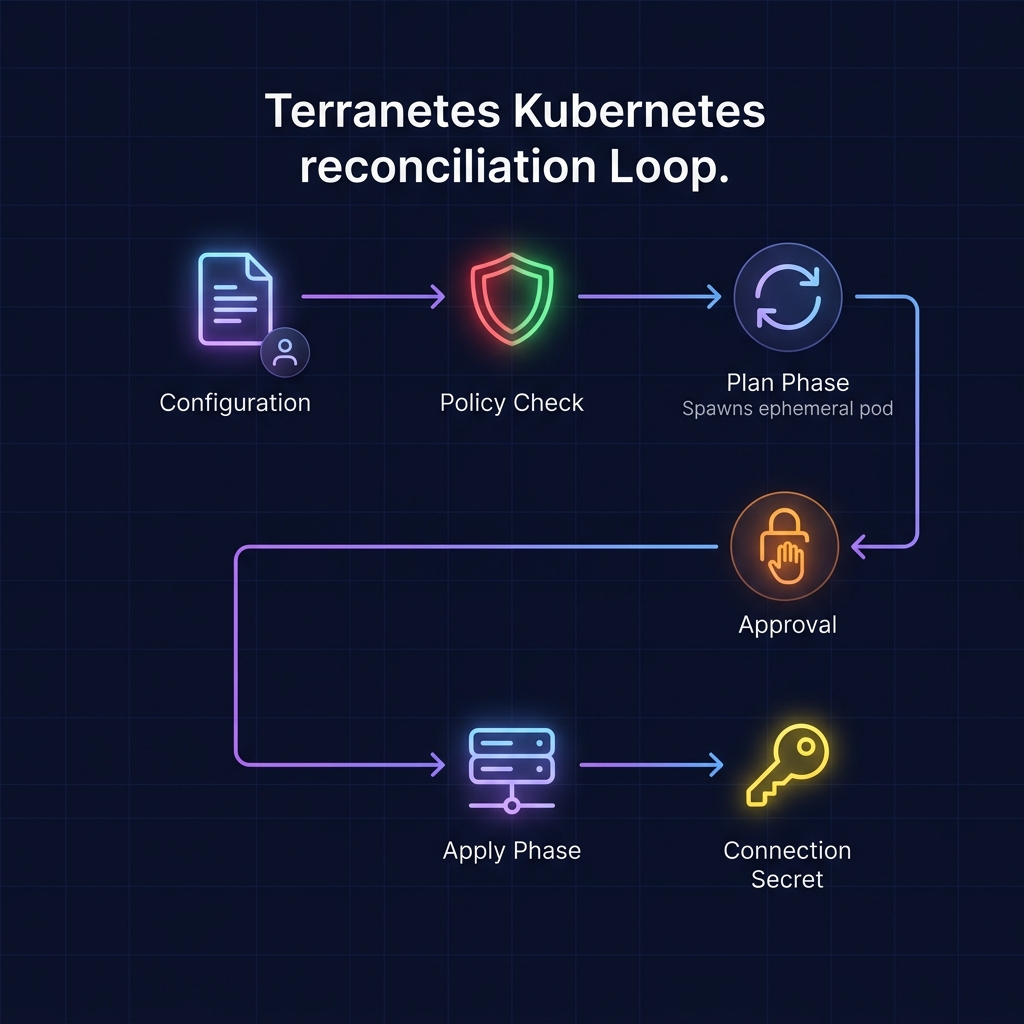
Let’s walk through each phase:
1. Reconciliation Trigger
The developer applies a Configuration manifest. The Configuration Controller detects the new resource and starts the reconciliation loop — exactly how any Kubernetes controller works.
2. Compliance Verification
Before executing any plans, the configuration is validated against all applicable Policy resources. If the manifest uses a prohibited module source, a blocked variable, or an out-of-budget estimate, the reconciliation stops and the status reflects the violation.
3. Plan Generation
An ephemeral runner pod is created to execute terraform init and terraform plan. The runner:
- Records the execution outputs
- Parses potential cost impacts (via Infracost integration)
- Posts the plan summary to the Configuration’s
.statusfield
You can watch the plan pod:
kubectl -n terranetes-demo get pods -l terraform.appvia.io/stage=plan -w
And stream its logs:
PLAN_POD=$(kubectl -n terranetes-demo get pods \
  -l terraform.appvia.io/stage=plan --no-headers | awk '{print $1}')
kubectl -n terranetes-demo logs -f ${PLAN_POD}
4. Approval Gate
By default, Terranetes pauses the pipeline until a platform engineer (or an automated process) explicitly approves the plan by annotating the resource:
kubectl -n terranetes-demo annotate configuration demo-k8s-resources \
  "terraform.appvia.io/apply"=true --overwrite
This is a deliberate security gate. No cloud resource is provisioned until someone has reviewed the plan. For lower environments, enableAutoApproval: true bypasses this step.
5. Provisioning & Export
Once approved, an apply runner pod deploys the resources to the target infrastructure. Upon completion, the runner:
- Extracts the module outputs
- Writes them as a Kubernetes Secret in the developer’s namespace
- Cleans up the runner pod
The developer’s application can then mount the outputs directly:
kubectl -n terranetes-demo get secret demo-terraform-outputs -o yaml
Drift Detection
Infrastructure drift is one of the hardest problems in operations. Someone modifies a cloud resource through the console, a manual kubectl edit changes a managed object, or a competing automation overwrites a setting. The Terraform state says one thing; reality says another.
Terranetes handles this with a continuous drift detection loop. When enableDriftDetection: true is set on a Configuration, the controller periodically runs terraform plan to compare the actual infrastructure against the desired state.
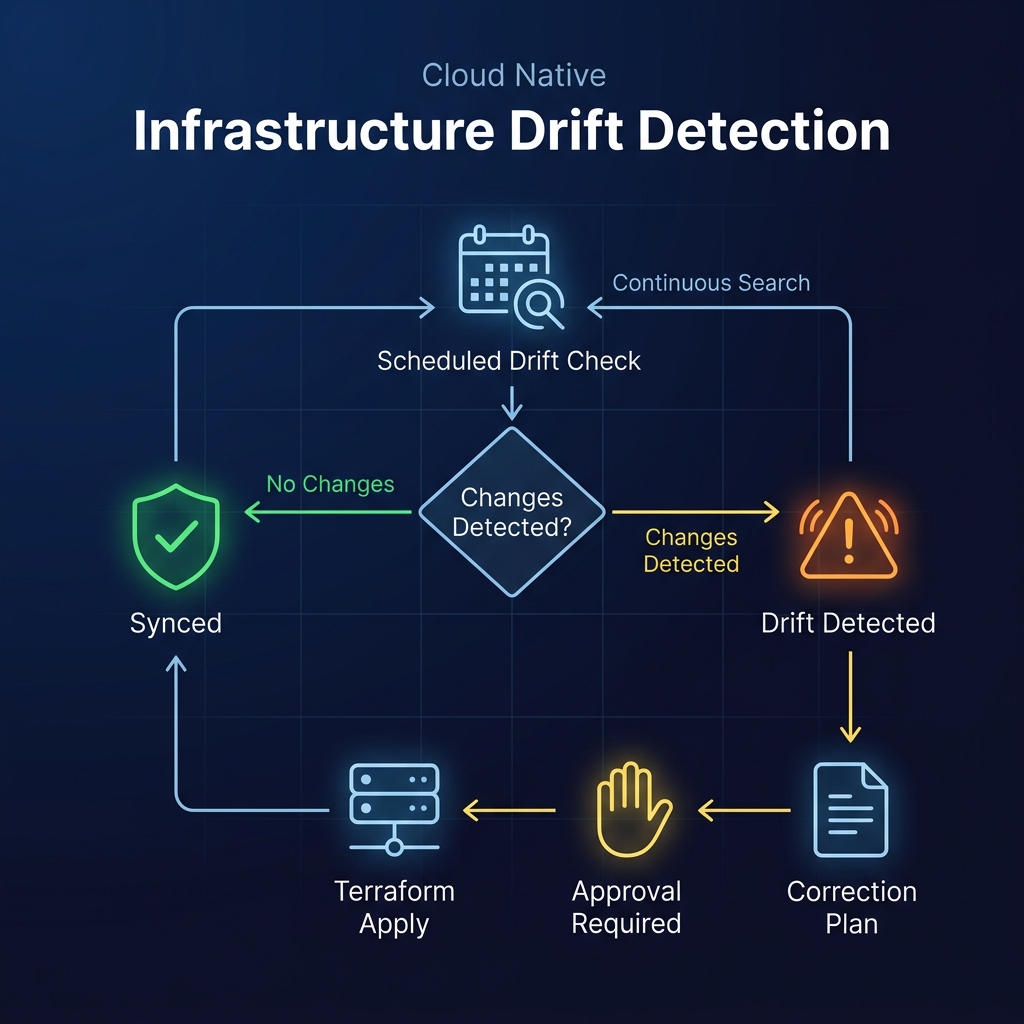
You can configure the drift interval and threshold at the controller level:
controller:
  driftInterval: 5m
  driftThreshold: 0.2
When drift is detected, the controller updates the Configuration status with the diff details. The correction follows the same plan → approve → apply workflow, maintaining the security gate even for automated remediation.
Here’s how you would test drift detection manually:
# Delete a managed resource out-of-band
kubectl -n terranetes-demo delete configmap demo-app-config

# Check the Configuration for drift conditions
kubectl -n terranetes-demo describe configuration demo-k8s-resources \
  | grep -A 5 -i "drift"

# Approve the correction plan
kubectl -n terranetes-demo annotate configuration demo-k8s-resources \
  "terraform.appvia.io/apply"=true --overwrite
The controller detects the missing ConfigMap, generates a plan to recreate it, and once approved restores it to the desired state.
Security & Isolation Model
Terranetes enforces a strict separation between infrastructure governance and infrastructure consumption. This isn’t just a best practice it’s baked into the architecture.
What Developers Can Do
- Create Configuration resources
- Reference approved Providers
- Consume generated Connection Secrets
- View plan status and cost estimates
What Developers Cannot Do
- View cloud credentials
- Access Terraform state
- Inspect execution pods
- Modify platform policies
- Execute Terraform directly
Because all execution occurs inside the terraform-system namespace managed by the platform team sensitive credentials and infrastructure state never leave the control plane. The developer’s namespace only ever sees the final outputs, delivered as a standard Kubernetes Secret.
Deployment Workflow
Getting Terranetes running involves four steps: install the controller, configure a Provider, set up RBAC, and apply your first Configuration.
1. Install the Controller
# Create namespaces
kubectl create namespace terraform-system
kubectl create namespace terranetes-demo

# Add Helm repository
helm repo add appvia https://terranetes-controller.appvia.io
helm repo update

# Install
helm install -n terraform-system terranetes-controller \
  appvia/terranetes-controller \
  --values values.yaml \
  --wait --timeout 5m
Verify the installation:
kubectl -n terraform-system get pods
kubectl get crd | grep terraform.appvia.io
2. Configure a Provider
apiVersion: terraform.appvia.io/v1alpha1
kind: Provider
metadata:
  name: kubernetes-injected
  annotations:
    terranetes.appvia.io/default-provider: "true"
spec:
  source: injected
  provider: kubernetes
  serviceAccount: terraform-executor
kubectl apply -f provider.yaml
kubectl get provider kubernetes-injected
3. Set Up RBAC
The executor ServiceAccount needs permissions to create resources in the target namespace:
apiVersion: rbac.authorization.k8s.io/v1
kind: ClusterRole
metadata:
  name: terranetes-demo-executor
rules:
  - apiGroups: [""]
    resources: ["pods", "secrets", "configmaps"]
    verbs: ["create", "delete", "get", "list", "patch", "update", "watch"]
  - apiGroups: [""]
    resources: ["namespaces"]
    verbs: ["get", "list", "watch"]
---
apiVersion: rbac.authorization.k8s.io/v1
kind: RoleBinding
metadata:
  name: terranetes-demo-executor
  namespace: terranetes-demo
roleRef:
  apiGroup: rbac.authorization.k8s.io
  kind: ClusterRole
  name: terranetes-demo-executor
subjects:
  - kind: ServiceAccount
    name: terraform-executor
    namespace: terraform-system
4. Apply a Configuration
apiVersion: terraform.appvia.io/v1alpha1
kind: Configuration
metadata:
  name: demo-k8s-resources
  namespace: terranetes-demo
spec:
  providerRef:
    name: kubernetes-injected
  module: configmap://terranetes-demo/terraform-demo-module
  variables:
    target_namespace: "terranetes-demo"
    resource_prefix: "demo"
  enableDriftDetection: true
  enableAutoApproval: false
  writeConnectionSecretToRef:
    name: demo-terraform-outputs
kubectl apply -f configuration.yaml

# Watch the plan job
kubectl -n terranetes-demo get pods -l terraform.appvia.io/stage=plan -w

# Once the plan completes, approve it
kubectl -n terranetes-demo annotate configuration demo-k8s-resources \
  "terraform.appvia.io/apply"=true --overwrite

# Verify deployed resources
kubectl -n terranetes-demo get configmap,secret,resourcequota,limitrange
Why Terranetes?
Here’s what makes Terranetes worth evaluating for your platform:
Terraform Module Reuse Reuses your existing library of Terraform and OpenTofu modules with zero modifications. No new DSL to learn, no module rewrites.
Enhanced Security Developers never need direct cloud access or credential visibility. The entire credential lifecycle stays within the controller namespace.
Continuous Drift Detection Automatically checks for out-of-band modifications and reports differences in the resource status. No more surprises during audits.
Kubernetes Native Fits naturally into GitOps workflows with ArgoCD or FluxCD. Configurations are just Kubernetes manifests they can be stored in Git, templated with Helm, and synced like any other resource.
Built-in Compliance Checkov policy validation runs as part of the reconciliation loop, not as a separate pipeline step. Non-compliant configurations are rejected before any infrastructure is touched.
Cost Visibility Infracost integration surfaces cost estimates directly in the Configuration status, so teams see the financial impact before approving a plan.
Conclusion
Terranetes sits at a sweet spot that many platform teams are looking for: the maturity and module ecosystem of Terraform, combined with the operational model of Kubernetes.
Developers get a self-service interface they already understand kubectl apply. Platform teams keep centralized governance over credentials, policies, and costs. The reconciliation loop handles drift, the admission webhooks enforce compliance, and the whole thing plugs into your existing GitOps workflow without friction.
If your organization already has a Terraform module library and a Kubernetes-based platform, Terranetes might be the shortest path from “we want developer self-service” to actually having it without abandoning the infrastructure tooling you’ve already invested in.